How to Calculate & Read a Contract Note

Ever read about a 'contract note'? Confused?? Don't understand? Let's break it down together to clear up the confusion.
What Is a Contract Note?
A Contract Note is where we as traders or investors can view completed transactions. For example, if you have bought shares, you can see your profit and loss through the portfolio that people usually screenshot, as long as the shares have not been sold.
However, once you have sold them, you can no longer view them from the portfolio because those shares are no longer considered part of your portfolio.
So the contract note is the place for us to know our completed buy and sell transactions.
Through the contract note, you can find out how much brokerage charges were imposed for buying and selling those shares.
This is the proof of your successful purchase and sale of shares.
This means when we buy, we know we have bought at a certain price. And when we sell at a certain price too. We can refer to everything in this contract note.
It is like a receipt — when we go to a shop, after paying for the goods, the cashier gives us a purchase receipt. We can refer to the receipt for anything.
View Contract Note Via Mplus Global
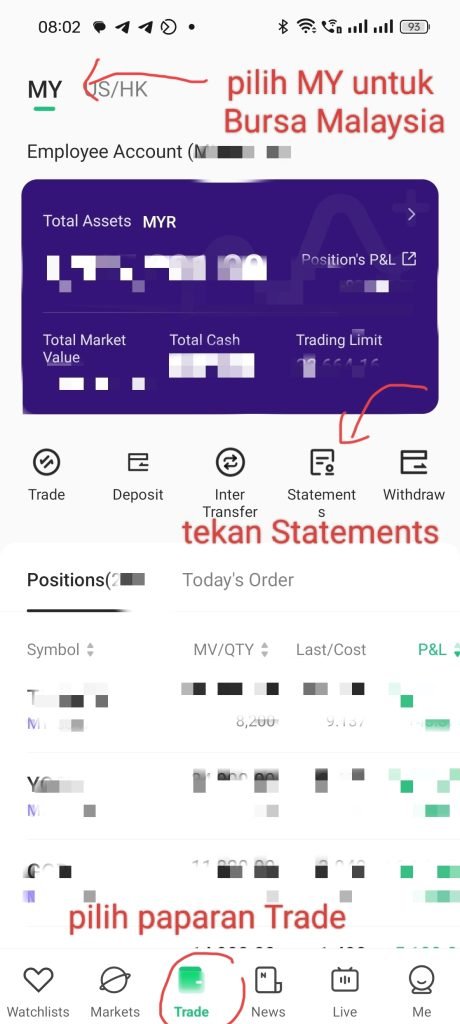
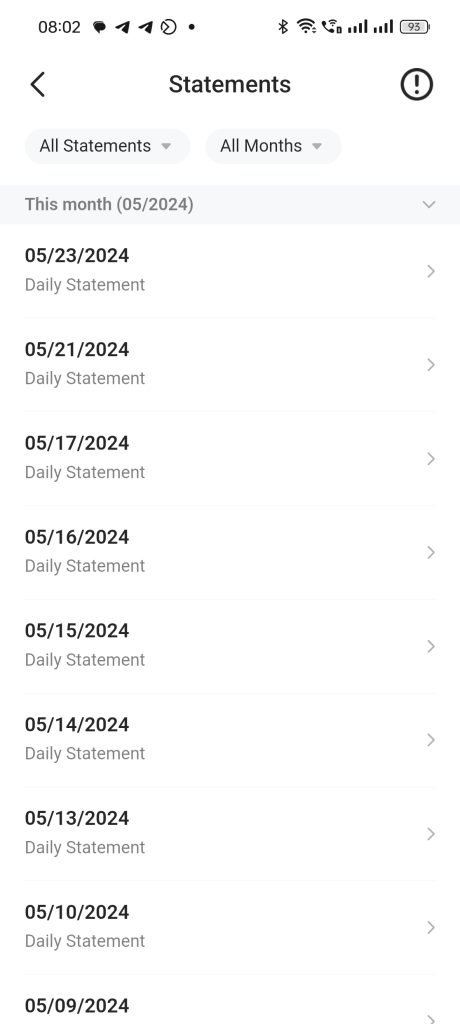
View Contract Note Via Mplus Online (Old)
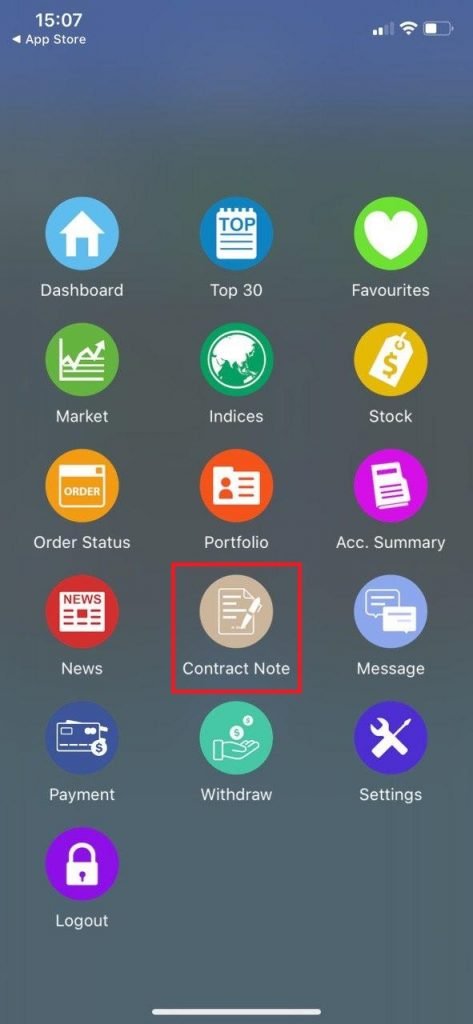
This is what it looks like if you are using the platform on your mobile phone.
For beginners, you can download the Mplus app on IOS or Play Store. Then log in to your Mplus account. After logging in, you will see a display as shown in the image.
So where do you view the contract note?
Click on contract note. The contract note will appear after you buy or sell any shares. You can see the details including the date of purchase and sale — everything is there.
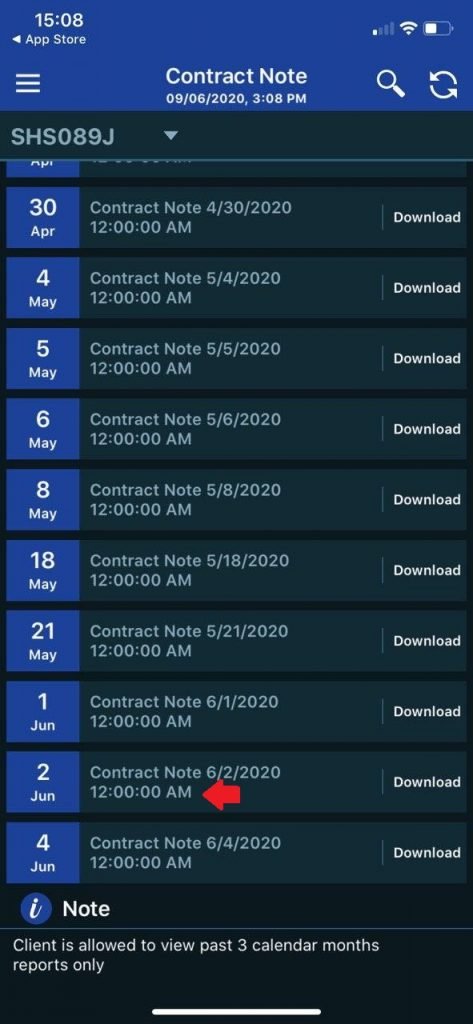
Based on this image, let's take the example from 2 June.
After you sell or buy, usually the Contract Note will only appear after 12 midnight. For example, if we trade today, it won't appear immediately because the system needs to update first.
At 12 midnight, Mplus will then issue your Contract Note.
So click on Download. The contract note is in PDF format. Make sure you have the WPS Office or Adobe Reader app to open it.
The PDF is password-protected — you need to enter your IC number without the '-' sign.
How to Read a Contract Note
After successfully opening your contract note, you need to know how to read it. All the details are in the contract note.
For example, you can see your CDS account number, Client Code, Remisier Code, CDS Shariah or Conventional status, and more.
Things You Need to Know in a Contract Note
1. Stock name: The name of the counter that was bought or sold.
2. Price: The price at which it was bought or sold.
3. Quantity: The total number of share units bought or sold. Note that 1 lot = 100 units.
4. Proceed: The buy or sell price x Quantity. The Proceed value does not yet include brokerage charges.
5. Colour: Blue – Buy & Red – Sell
About Brokerage
1. Brk. Amt: The brokerage charge imposed is a minimum of RM8 or 0.08%. However, for Intraday you will only be charged 0.05%. Other than Intraday, the charge is 0.08%. For example, if you hold, you will be charged 0.08%.
2. Brk ST: The SST charge is 6% of the Brokerage Amount (Brk. Amt).
For example, 0.06 x RM8 (Brk Amt) = RM0.48
Note: the contract note in this example is from 2020. Since 1 January 2022, brokerage on shares listed on Bursa Malaysia is exempt from SST, so Brk. ST on a current contract note is RM0.00. Without it, the buy total in this example would be RM1,136.34 and the sell total RM1,307.60.
3. Brk. Rate %: 0.05% for Intraday and 0.08% for non-Intraday.
4. Stamp Duty: The amount that Bursa needs to pay to LHDN (Inland Revenue Board). If empty, it means no charge is imposed. Some shares are exempted from Stamp Duty. You can check on the Bursa website www.bursamalaysia.com
Usually the Stamp Duty charge is RM1 for every RM1,000 of purchase or sale. For example, if you buy shares worth RM5,000, the Stamp Duty charged would be RM5.
5. Clr. Fee: The Clearance Fee is 0.03% of the Proceed value.
For example, a buy proceed value of RM5,000. So RM5,000 x 0.03% = RM1.50
6. Total Amt: The actual total amount you buy or sell after factoring in brokerage charges.
Proceed + Brk. Amt + Brk ST + Stamp Duty + Clr. Fee = Total Amount
How to Calculate Net Profit
Total Amount Sell – Total Amount Buy = Net Profit
Example Scenario
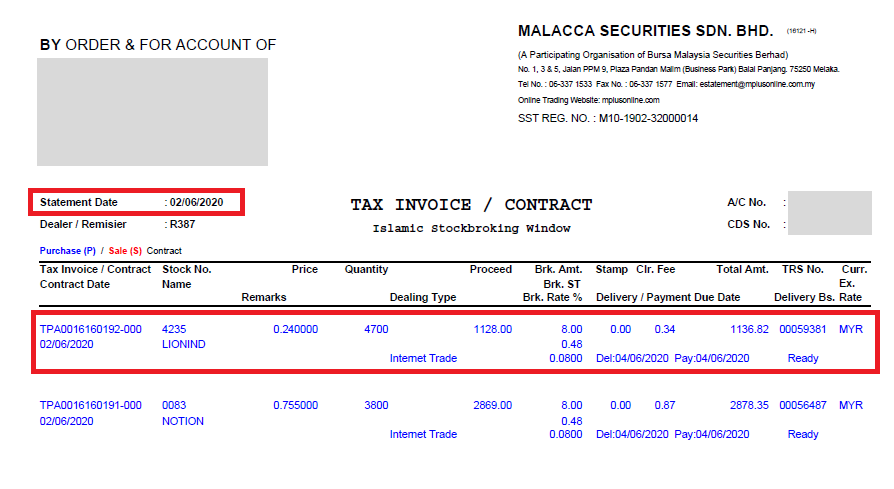
This is my contract note on 2 June 2020.
I bought the counters LIONIND and NOTION. Let's calculate together the charges I incurred and the total price I bought and sold these share counters for.
Let's take the LIONIND counter as an example. I will show each charge listed one by one.
1. Proceed
= RM0.24 x 4,700 units = RM1,128. This is the total purchase amount before adding brokerage charges.
2. Brokerage Charges:
i) Brk. Amt = RM8 because the minimum Mplus broker charge is RM8, as explained earlier.
ii) Brk. ST = 6% x RM8 (Brk. Amt) = RM0.48
iii) Brk. Rate % = 0.08% because I held this counter for 2 days before selling. So the non-Intraday charge is 0.08%. The Intraday charge is 0.05%, as explained earlier.
iv) Stamp Duty = RM0. This means no charge was imposed. Normally, every RM1,000 would be charged RM1 in Stamp Duty, which would be RM1.13 because RM1,128/RM1,000 = RM1.128 ~ RM1.13.
However, there is no Stamp Duty for the LIONIND counter because Bursa Malaysia exempts several counters from Stamp Duty.
So I get to save!
v) Clr. Fee = RM0.34 because 0.03% x Proceed value of RM1,128
vi) Total Amt = RM1,136.82 (Proceed + Brk. Amt + Brk ST + Stamp Duty + Clr. Fee).
RM1,128 + RM8 + RM0.48 + RM0.34 = RM1,136.82
So the total I paid to buy LIONIND was RM1,136.82
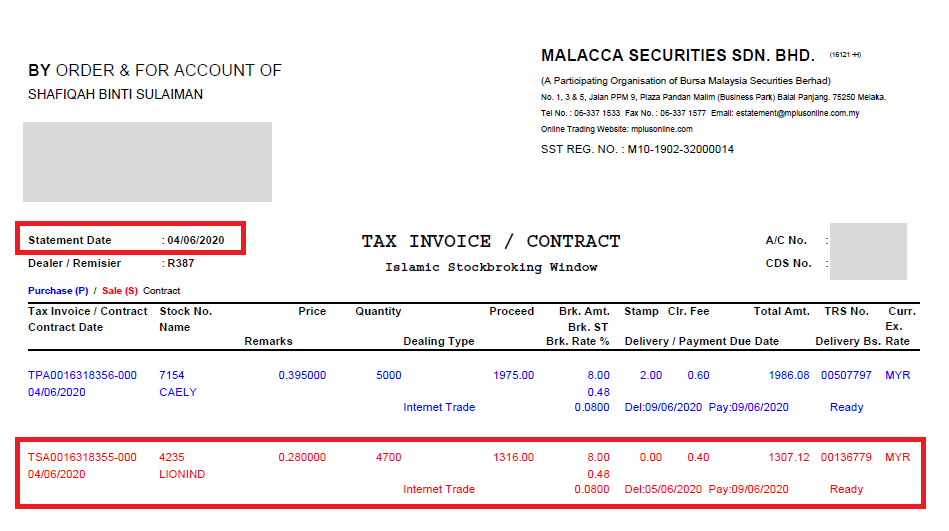
Now let's calculate the charges I incurred when selling LIONIND on 4 June 2020. Let's calculate together.
1. Proceed
= RM0.28 x 4,700 units = RM1,316. This is the total sale amount before deducting brokerage charges.
2. Brokerage Charges:
i) Brk. Amt = RM8. Same because the minimum Mplus broker charge is RM8, as explained earlier.
ii) Brk. ST = 6% x RM8 (Brk. Amt) = RM0.48
iii) Brk. Rate % = 0.08% because this counter is NOT Intraday, meaning buying and selling on the same day. So the non-Intraday charge is 0.08%.
iv) Stamp Duty = RM0. This means no charge was imposed. Normally, every RM1,000 would be charged RM1 in Stamp Duty, which would be RM1.32 because RM1,316/RM1,000 = RM1.316 ~ RM1.32.
However, there is no Stamp Duty for the LIONIND counter because Bursa Malaysia exempts several counters from Stamp Duty, as explained earlier.
So I get to save!
v) Clr. Fee = RM0.40 because 0.03% x Proceed value of RM1,316
vi) Total Amt = RM1,307.12 [Proceed – (Brk. Amt + Brk ST + Stamp Duty + Clr. Fee)].
RM1,316 – (RM8 + RM0.48 + RM0.40) = RM1,307.12
Looking at this, the total brokerage charges amounted to only RM8.88 (RM8 + RM0.48 + RM0.40).
So the total I received from selling LIONIND was RM1,307.12.
Therefore, my net profit was RM1,307.12 – RM1,136.82 = RM170.30
Comparison of Transaction Costs Between Different Stockbrokers
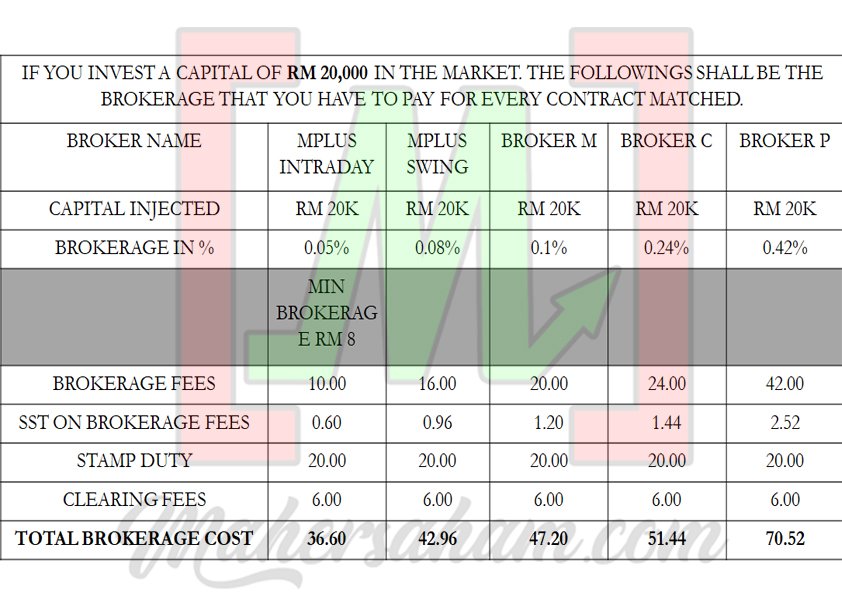
If you refer to the chart above, the cost comparison example is between Mplus broker and 3 other brokers, though I have not stated the names of those brokers.
The example shown above is when you purchase shares worth RM20,000 and how much total brokerage cost you would need to pay.
According to the calculation provided in the chart above, the total brokerage cost for Mplus broker is the cheapest at RM36.60 for intraday and RM42.96 for swing.
However, if you use broker M, broker C, or broker P, the total brokerage cost you would need to pay is RM47.20, RM51.44, and RM70.52 respectively.
The total brokerage cost you need to pay differs significantly between the various brokers available.
What are you waiting for? Register a CDS account with Mahersaham and you can join exclusive classes for Mahersaham clients.
Conclusion
So after this, you can refer to your Contract Note if you want to know how much net profit you earned after factoring in the charges imposed.
Based on all the charges we calculated, the total Mplus charges are around RM8–RM15 for each buy or sell transaction.
So every time you buy and sell shares, you can estimate that the total buy and sell transaction charges are only around RM16–RM30.
Other brokers may charge higher than Mplus. So we can see here that Mplus broker charges are relatively cheap compared to other brokers.
Hope this was helpful!
You can also watch the video on how to calculate using a Contract Note that Mahersaham has prepared below.
New to stocks?
Want to learn about stocks? Want to know more?
But don't know where to start?
Don't worry, download the FREE Mahersaham ebook now!
Still don't have a CDS account? Open one at akauncds.com
FAQ About Contract Notes in Malaysia
What is a contract note in stock trading?
A contract note is an official document that records your completed buy and sell transactions in the stock market. It serves as a receipt showing all the details of your trades, including the stock name, price, quantity, and all brokerage charges incurred.
How do I access my contract note on Mplus?
You can access your contract note through the Mplus Global app or the older Mplus Online platform. After logging in, click on "Contract Note" in the menu. Notes are typically generated after 12 midnight on the trading day. The PDF document is password-protected with your IC number (without dashes).
How much are the brokerage charges on Mplus?
Mplus charges a minimum of RM8 or 0.08% per transaction for swing trades, and 0.05% for intraday trades. Additional charges are a 0.03% clearing fee and stamp duty of RM1 per RM1,000 (some counters are exempted). Brokerage on Bursa shares has been exempt from SST since 1 January 2022. Total charges typically range from RM8–RM15 per transaction.
How do I calculate net profit from a contract note?
To calculate net profit, use this formula: Total Amount Sell – Total Amount Buy = Net Profit. The Total Amount already includes all brokerage charges, so the result gives you your actual profit or loss from the trade.