KLSE Screener: Your Essential Tool for Stock Investing

KLSE Screener is one of the must-have apps if you are looking for a mobile application to assist you with stock investing.
This application can be downloaded for free by both Android and iPhone users. Here are some of the useful features you can take advantage of:
-
Stock Alerts
Many stock investors are tied up with work during market hours. So you may not always have the time to monitor share price movements.
To make things easier, you can use the alert function to semi-automate your stock investing process.
You should already have a shortlist of counters and have done your research to identify the nearest resistance and support levels for those counters.
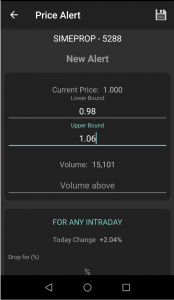
Then you can enter the values in the lower bound and upper bound fields.
Not sure how to conduct technical analysis? Learn about the Most Powerful Candlestick Patterns and understand What Technical Analysis Is.
For example, take the counter Sime Prop, with a current price of RM1. Let's say you have already purchased the stock but now don't have time to monitor price movements.
So you can use the alert feature. Select the three-dot icon, then choose alerts.
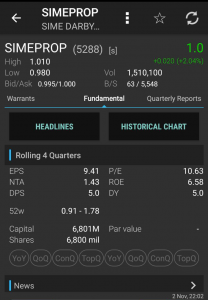
Select the + sign, then enter the support price in the lower bound field and the resistance price in the upper bound field, then select save.
All you need to do is wait — if the price rises or falls to your preset levels, your phone will sound an alert.
2. Paper Trade
Paper trade or virtual trade refers to a simulation of buying stocks without using real money.
If you do not yet have sufficient capital to start investing in stocks, you can begin with paper trading first.
Get into the habit of researching stocks and then making mock purchases to see whether you can generate a profit or a loss.
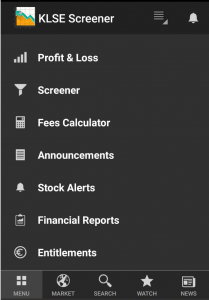
From there, you will gain the experience of feeling what it is like to win and lose. To use this feature, go to the Profit & Loss section.
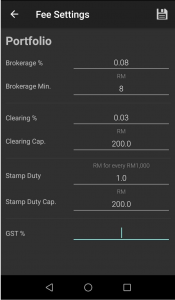
For first-time use, you need to configure the fees settings first. These fees differ according to each brokerage's fee structure.
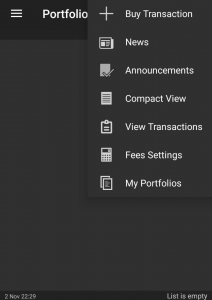
If you are an M+ user, use the sample amounts shown in the image below:
3. Financial Reports & Entitlements Update
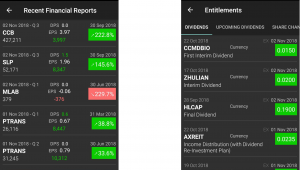
KLSE Screener also provides the convenience of checking the latest news on financial reports as well as entitlements such as dividend distributions or bonus issue announcements.
Want to learn more about bonus issues? Read Rights Issue and Bonus Shares for PWorth.
For further learning about KLSE Screener, we have also prepared a video for you to watch.
https://www.facebook.com/mahersaham/videos/1845800512319097/
Frequently Asked Questions (FAQ)
What is KLSE Screener?
KLSE Screener is a free mobile application available on Android and iPhone that helps Malaysian stock investors monitor share prices, set alerts, simulate trades via paper trading, and track financial reports and entitlements.
Is KLSE Screener free to use?
Yes, KLSE Screener can be downloaded and used for free on both Android and iOS devices.
How do stock alerts work in KLSE Screener?
You set a lower bound (support level) and upper bound (resistance level) for a specific counter. When the share price reaches either level, your phone will receive a notification alert.
What is paper trading in KLSE Screener?
Paper trading is a simulation feature that allows you to practise buying and selling stocks without using real money. It is ideal for beginners who want to gain experience before committing actual capital.
Interested in learning more about stock investing on Bursa Malaysia?
Download our free stock basics ebook to get started with the fundamentals of stock investing.
Ready to start investing? Open your CDS account with our step-by-step guide here.