You Hit Buy But Your Stock Order Didn't Match? Here's What's Really Happening

You've opened your broker platform, the share price is right there on the screen, you click "Buy", enter what looks like a reasonable price, and submit. Suddenly the order just hangs in "Open" status. Doesn't match. Nothing changes. You assume the platform has a glitch, or your broker messed up.
The truth is - nothing is broken. This is one of the most common confusions among new investors on Bursa Malaysia. They don't actually understand how market depth works and why the price showing on the screen is NOT necessarily the price you'll get.
Short Answer
Your buy order didn't match because the limit price you entered is lower than the lowest Ask price (best ask) in the market depth. To buy immediately, your order needs to match the Ask side (sellers), not the Bid side (buyers). If you place a lower price, your order will sit in the queue waiting until a seller agrees to sell at that price.
Let's break this down further and walk through the 8 main reasons your buy order may not be matching.
What Is Market Depth? Quick Refresher
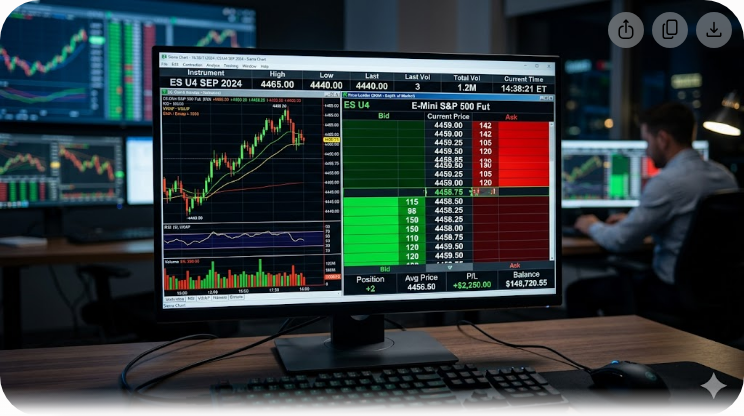
Market depth is the display of active buy (bid) and sell (ask) orders for a stock at any given moment. It shows who wants to buy how many units at what price, and who wants to sell how many units at what price.
If you're new to this concept, read Understanding Market Depth first for a stronger foundation before continuing.
What you need to know now are the two key columns:
- Bid (Buy) - the price other buyers are willing to pay for the stock
- Ask / Offer (Sell) - the price sellers are willing to release their shares at
Which Side Does Your "Buy" Order Match?
This is the biggest source of confusion that prevents orders from matching.
When you BUY a stock, the system attempts to match your order against the ASK side (sellers). The logic is straightforward - for you to receive shares, someone else has to RELEASE their shares. Sellers sell at the Ask price.
This means:
- To match immediately, your buy limit price must be equal to or higher than the best ask
- If you place a buy limit lower than best ask, your order only joins the Bid queue - waiting until a new seller comes in willing to sell at your lower price
Practical example: Best Bid RM1.50, Best Ask RM1.52.
- If you buy limit RM1.50 - your order won't match now. It only matches if a new seller enters with ask RM1.50
- If you buy limit RM1.52 - your order matches immediately with an existing seller
- If you buy limit RM1.55 - your order matches the best ask RM1.52 (you get a better price than you specified)
Reason #1: Your Limit Price Is Lower Than Best Ask
This is the most common reason. Many new investors look at "Last Done Price" or "Last Traded Price" and set their buy price at the same level or lower, expecting it to match.
But Last Done Price is just the price of the last completed transaction. Its size may be different from the current best ask, especially if the stock is illiquid or the market is volatile.
Fix: Open market depth, check the current BEST ASK, and set your buy limit at or above that price if you want immediate match.
Reason #2: Lot Size Is Incorrect (100 Units)
Bursa Malaysia uses a board lot size of 100 units. Your order quantity must be in multiples of 100 - 100, 200, 300, 1,000, and so on.
If you try to buy 50 units or 150 units in the regular board lot market, the system will reject it. To buy quantities below 100 or non-multiples of 100, you need to use the odd lot market, which is a separate marketplace.
Fix: Make sure your order quantity is a multiple of 100 for the regular board lot market. For odd lots, use Bursa's special odd lot market.
Reason #3: Insufficient Funds Including Fees
The capital you think is enough to buy stocks may actually be insufficient after accounting for:
- Brokerage fees (typically 0.05% to 0.42% depending on broker and tier)
- Clearing fee (0.03%)
- Stamp duty (RM1 per RM1,000 or max RM1,000)
To buy RM10,000 of shares, you may need approximately RM10,070-RM10,200 in your trust account. If your balance is exactly RM10,000, the order may be rejected with "insufficient buying limit".
Fix: Always keep a 1-2% buffer in your trust account to cover fees and tax. Refer to the trust account and transaction cost guide for a full breakdown.
Reason #4: You're Ordering Outside Matching Hours
Bursa Malaysia has several trading phases, each with different matching rules. Based on the official Bursa schedule:
- Pre-Opening Session 1: 8:30 AM - 9:00 AM - orders can enter but DON'T match. They only match at 9:00 AM at Opening Price
- Session 1: 9:00 AM - 12:30 PM - continuous matching
- Lunch Break: 12:30 PM - 2:30 PM - orders queue but don't match
- Pre-Opening Session 2: 2:00 PM - 2:30 PM
- Session 2: 2:30 PM - 4:45 PM - continuous matching
- Pre-Closing: 4:45 PM - 4:50 PM - orders can enter but only match at the calculated Closing Price at 4:50 PM
- Trading at Last (TAL): 4:50 PM - 5:00 PM - matching only at the fixed Closing Price
If you submit an order at 8:50 AM at RM1.50 but the opening price ends up being RM1.55, your order WON'T match. You'd need to place a new order at the actual market price after opening.
Fix: For guaranteed matching, trade during continuous matching sessions (9:00 AM - 12:30 PM and 2:30 PM - 4:45 PM). Avoid placing orders you want matched immediately during pre-opening or pre-closing phases.
Reason #5: Stock Changed Shariah Status
If you use a Shariah-compliant trading account, your broker blocks you from purchasing stocks newly removed from the Shariah-compliant list.
Suruhanjaya Sekuriti Malaysia updates the Shariah-compliant securities list twice a year - typically at the end of May and November. The stock you intend to buy may have changed status, but the price display on your platform still looks normal.
Your order will be rejected with messages like "stock not allowed" or "non-shariah compliant".
Fix: Check the current Shariah status before buying. For conventional accounts, this doesn't apply.
Reason #6: Stock Is Halted or Suspended
Sometimes Bursa Malaysia will halt trading on a stock temporarily (trading halt) or longer (suspension). Common reasons:
- The company is about to make a material announcement
- Abnormal price or volume movement
- Listing requirement compliance issues
- Disciplinary action from Bursa
If you try to buy a halted stock, the order won't match - no matter what price you set.
Fix: Check stock trading status on Bursa Malaysia's website or your broker platform. The status is typically shown as "Suspended" or "Halted" on the price display.
Reason #7: Market Order on Low Liquidity Stock
Market orders should match immediately at the best ask price. But for illiquid stocks (low volume, wide bid-ask spread), your market order may:
- Match at a price much higher than Last Done Price
- Only fill partially with the rest hanging
- Or on certain platforms, be rejected entirely if quantity is too large
Example: You want to buy 10,000 units of a small-cap stock. Best Ask only has 500 units at RM2.00. Next 1,000 units at RM2.05, then 2,000 units at RM2.10. Your market order will "walk the ladder" and you'll get an average price far higher than RM2.00.
Fix: For low-liquidity stocks, use limit orders. Break large orders into multiple smaller orders. Don't blindly hit market order without checking depth.
Reason #8: Wrong Tick Size
Bursa Malaysia has minimum tick size rules that vary by stock price:
- Stocks below RM1.00: tick 0.005 (e.g., RM0.965, RM0.970, RM0.975)
- Stocks RM1.00 to RM2.99: tick 0.01
- Stocks RM3.00 to RM9.99: tick 0.01
- Stocks RM10.00 to RM24.98: tick 0.02
- Stocks RM25.00 and above: tick 0.02
If you set a price that isn't a multiple of the allowed tick size (e.g., RM0.977 for a sub-RM1 stock), the platform will reject it or auto-round to the nearest tick.
Fix: Set price at a valid tick. Modern platforms typically auto-suggest the nearest tick.
How to Make Sure Your Buy Order Matches
After understanding the 8 reasons above, here are practical tips to ensure your order succeeds:
- Always check market depth first - not just Last Done Price
- Set limit price at or above best ask if you want immediate match
- Calculate capital including fees - leave a 1-2% buffer
- Trade during continuous matching sessions for the most predictable results
- For low-liquidity stocks, use small limit orders instead of one large market order
- Check stock trading status before ordering - don't buy something halted
- For Shariah accounts, verify current Shariah status
- Wait for "All Matched" confirmation in order status - not "Open" or "Partial Matched"
Good trading discipline starts with understanding these basic mechanics. Without grasping market depth, you'll keep being confused why your order doesn't match no matter how many times you hit the Buy button.
FAQ
1. What's the difference between a Limit Order and a Market Order?
A Limit Order is when you set the maximum price you're willing to pay (for buy) - the system only matches if there's an offer at that price or lower. A Market Order has no price - the system matches against the best available ask immediately, so you'll get the shares but possibly at a higher price than you expect.
2. Why does my order show "Partial Matched"?
This means part of your quantity was filled but not all of it. For example, you ordered 1,000 units at RM2.00, only 400 units were available at best ask RM2.00, so the remaining 600 units are queued waiting for a new offer at RM2.00.
3. Can I modify or cancel an Open order?
Yes. Orders with "Open" or "Unmatched" status can be modified (change price or quantity) or cancelled outright, as long as the market is open. Orders already "Matched" cannot be reversed.
4. How long will my order stay pending if it doesn't match?
Depends on the validity period you choose. The default is usually "Day" - the order auto-cancels at the end of the trading day if unmatched. There are also GTC (Good Till Cancelled) or GTD (Good Till Date) options, but not all brokers support these.
5. Why does the platform say "insufficient buying limit" when I have funds in my account?
Because buying limit calculations include holdings for fees, tax, and sometimes outstanding margin loans. Make sure your trust account balance exceeds the purchase value + 1-2% buffer for fees.
6. Can I buy foreign stocks outside Bursa Malaysia hours?
Not for Bursa Malaysia stocks on Malaysian platforms. Bursa Malaysia has fixed trading hours. For US or Hong Kong stocks, trading hours differ and multi-market platforms like M+ Global allow orders across time zones.
7. How do I know if a stock is halted?
"Halted" or "Suspended" status will be displayed on the stock price page in your broker platform and also on Bursa Malaysia's website. Typically accompanied by an announcement from the company explaining the reason.
8. If my market order doesn't fully match, does the rest become a limit order?
Depends on the broker. Some brokers auto-convert remaining market order quantity to a limit order at the last match price. Others will cancel the remainder. Check your broker's policy.
Conclusion
Confusion about why buy orders don't match is the biggest hurdle for new investors on Bursa Malaysia. The reality is you don't fully understand market depth fundamentals - specifically that your buy order must match the ASK side, not the BID.
Understanding the 8 main reasons above and practicing the tips for ensuring matches will save you time, reduce frustration, and most importantly, make you more confident in your trading decisions.
Before trading stocks, make sure you use a platform that lets you access real-time market depth and place orders smoothly.
To start trading on Bursa Malaysia and access the M+ platform with full market depth functionality, open a CDS account with us - an account that lets you invest in Bursa Malaysia as well as overseas markets like the US and Hong Kong.
For a solid foundation in stock investing before you start, download our Free Stock Investing Basics Ebook.
Further Reading
- Understanding Market Depth: A Simple Guide to Bid & Ask
- Bid-Ask, Volume & Supply and Demand in Stocks Explained
- What Is Bid in Stocks? Understanding Bid Size & Price Movement
- What Does Neutral Mean in M+ Global? Buy, Sell & Neutral Trade Explained
- How to Buy and Sell Shares on the MPLUS (M+) Platform