CDS Account Service Requests: Reset Password, Market Depth & IPO Financing From Your Dashboard

Previously, if you wanted to reset your M+ Online password, request 5-level market depth or apply for IPO Financing, you had to fill in a Google Form or wait for our support team to process it manually. Now everything can be done straight from your mahersaham.com dashboard — and your request is forwarded automatically to the M+ team for processing.
In this tutorial we show you how to use the CDS Account Service Request page: what you can request, how to submit, and what happens after you press the Submit button.
Don't have a Mahersaham account yet? Read how to sign up for a Mahersaham account first — it's free and takes just 2 minutes.
Who Can Use This Feature?
This feature is for all clients with a Mahersaham CDS account — that is, a trading account opened through Remisier Maher at Malacca Securities. If you are not a client yet, you can open a CDS account through Mahersaham first.
One important thing: log in to mahersaham.com using the same email you registered when opening your CDS account. The system automatically matches your email to your client code — if they match, your client code appears in the form without any typing.
How to Access: Dashboard → Account Service Request
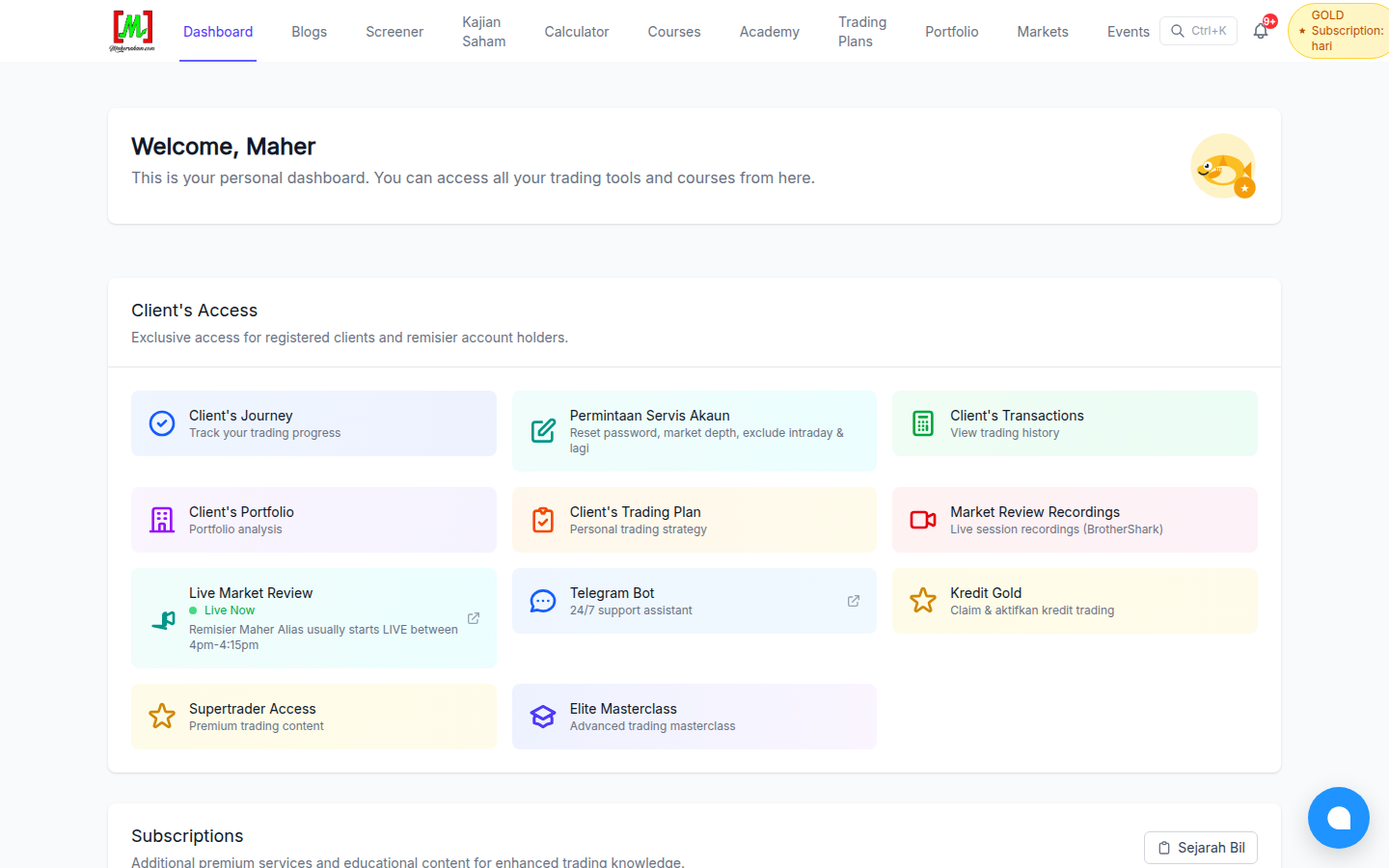
After logging in, go to your Dashboard and find the Client's Access section. Click the Permintaan Servis Akaun (Account Service Request) card — or go directly to mahersaham.com/dashboard/cds-request.
6 Request Types Available
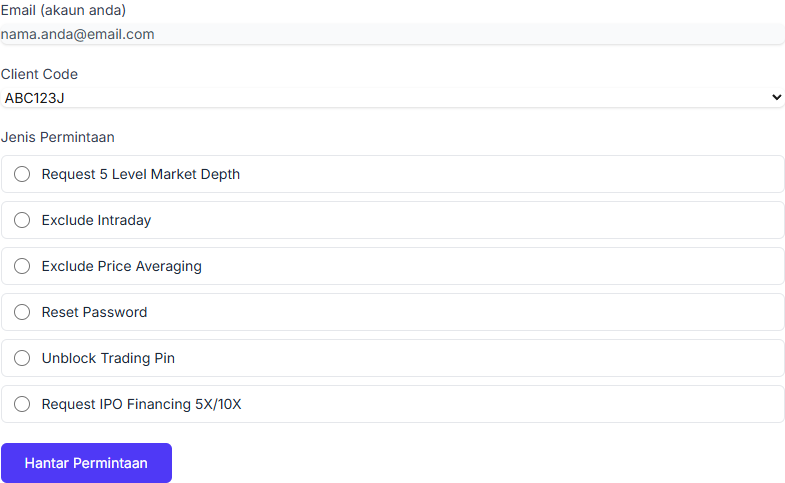
There are currently 6 request types you can submit:
- Request 5 Level Market Depth — unlock the 5-level bid and ask price display in M+ Online, so you can see market queue depth more clearly. Note: M+ has eligibility requirements for this feature, so the request may be rejected if your account does not yet qualify.
- Exclude Intraday — remove the intraday feature from your M+ Online account.
- Exclude Price Averaging — so that purchase prices in your M+ portfolio view are not automatically averaged when you buy the same counter multiple times.
- Reset Password — reset your M+ Online login password. The new password will be sent to your registered email.
- Unblock Trading Pin — if your trading PIN is locked after too many wrong attempts, this request unlocks it.
- Request IPO Financing 5X/10X — apply for IPO financing through M+ Global (explained in detail below).
How to Submit a Request
The process is very simple:
- Make sure the correct Client Code is selected. If you have more than one account, choose from the dropdown list.
- Select the Request Type.
- Press the Hantar Permintaan (Submit Request) button.
That's it. Your request goes straight into our system and is forwarded automatically to the M+ team for processing — no WhatsApp messages, no Google Forms.
IPO Financing 5X/10X: Requirements & How to Apply
After you submit a request, the 5X/10X button only appears when M+ has quota available. The full explanation of quotas, "Fully Subscribed" and top-up times is in IPO Financing 5X/10X Button Not Showing on M+? Here's Why.
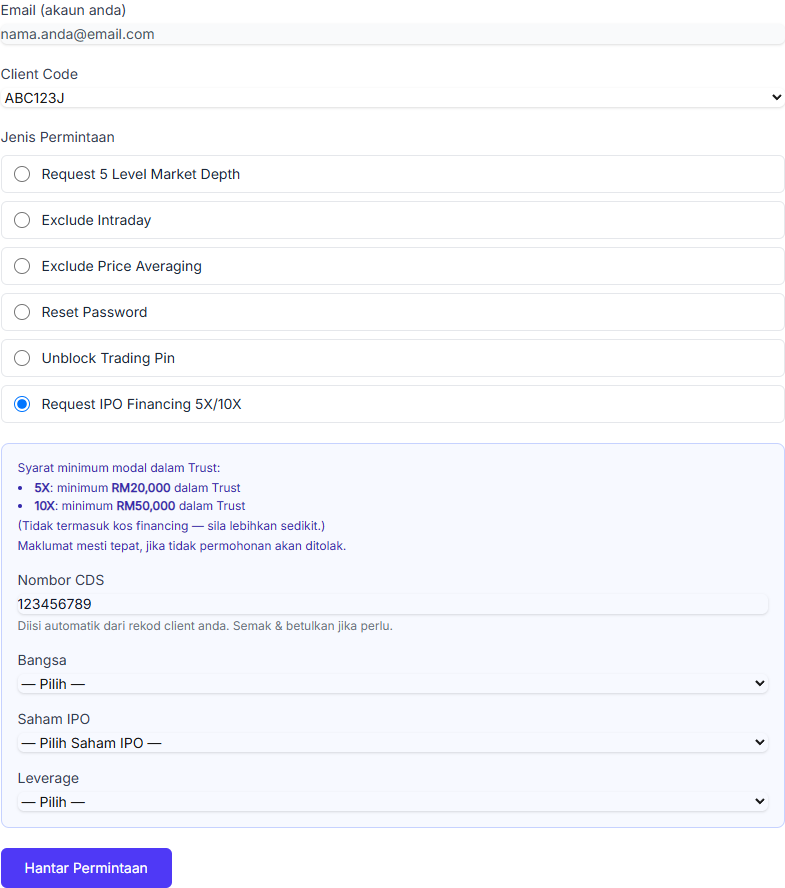
When you select Request IPO Financing 5X/10X, an additional form opens. Before applying, make sure you understand the minimum capital requirements in your Trust account:
- 5X leverage — minimum RM100,000 in Trust
- 10X leverage — minimum RM100,000 in Trust
These amounts exclude financing costs, so it is wise to keep a little more than the minimum. Then complete the following details:
- CDS Number — usually filled in automatically from our records. If it is empty, enter your 9-digit CDS number.
- Race — Bumi or Non-Bumi (following IPO allocation categories).
- IPO Stock — choose an open IPO from the list. This list updates automatically based on the official M+ Global form.
- Leverage — 5x or 10x.
Make sure every detail is accurate — otherwise M+ will reject the application. After you press Submit, our system fills in the official M+ Global form on your behalf automatically.
What Happens After You Submit?
This is where the new system shines:
- Your request is recorded — you can review it any time in the Sejarah Permintaan Anda (Your Request History) section on the same page.
- Forwarded automatically to M+ — your request is channelled directly to the M+ dealer team during working hours (Monday–Friday, 8:30am–6:00pm).
- Status updated — once M+ finishes processing, your request status changes to completed automatically.
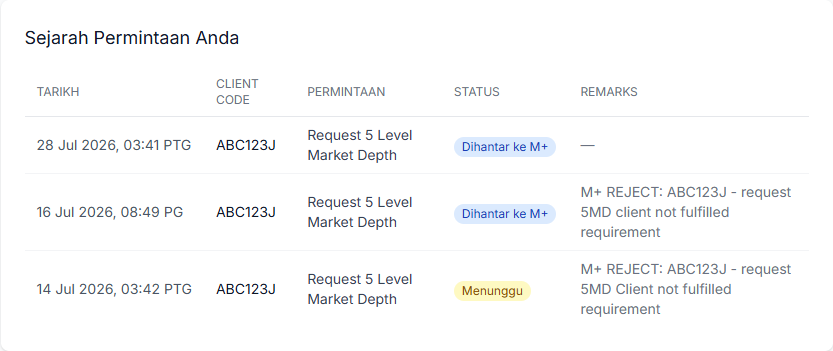
A request moves through three statuses: Menunggu (waiting - not yet forwarded to M+), Dihantar ke M+ (forwarded to the dealer team, awaiting action), and Selesai (M+ confirmed it is done). If M+ rejects a request, the reason appears in the Remarks column - for example if your account does not yet meet the 5 Level Market Depth eligibility requirements.
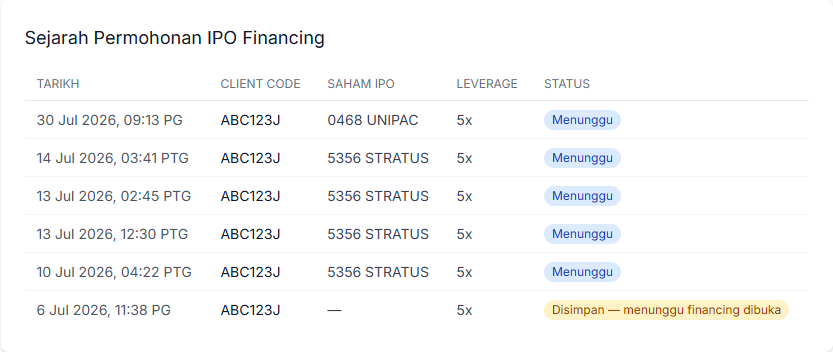
IPO Financing applications have their own separate table, Sejarah Permohonan IPO Financing (IPO Financing Application History), showing the IPO stock, leverage and status of each application - including statuses like "Disimpan - menunggu financing dibuka" (saved - waiting for financing to open) when the M+ financing quota is not yet available.
For requests involving account security (reset password, unblock PIN), the outcome is sent by M+ directly to your registered email — not through us. This protects your account.
Seeing "Access Denied" or "Unauthorised"? Here's What It Means
Many clients contact us with the same messages: an "Access has been denied" popup when trying to log in, or an "Unauthorised" screen on the web or app. In most cases this is not a technical problem with your device - it means the account has been automatically locked after more than 3 wrong password attempts.
What to do:
- Stop retrying the old password - every additional failed attempt only keeps the account locked.
- Submit a password reset request - use the service request form on the dashboard as described above, or PM our team at t.me/mahersahamplatform with your client code.
- Wait for a new email from M+ - M+ will send a temporary password to your registered email. Log in with it and change to a new password.
If the "unauthorised" error persists even after a reset (for example on web or laptop for several days), send a full screenshot of the error together with your client code to our team - such cases need a direct check with M+.
Frequently Asked Questions
How long does my request take?
Most requests are completed within the same working day if submitted during office hours. Requests submitted at night, on weekends or public holidays are processed on the next working day.
Why doesn't my client code appear in the dropdown?
Most likely your Mahersaham account email is different from the email registered when you opened your CDS account. You can still type your client code manually — but for sensitive requests like password resets, the system only processes them automatically if the client code is genuinely registered under your email. If they don't match, our team reviews it manually first.
Why was my request rejected?
Some features like 5 Level Market Depth have eligibility requirements set by M+. For IPO Financing, make sure your Trust balance is sufficient and every detail is accurate. If a request is rejected, our team is notified and can help you check the reason.
Can I submit the same request twice?
You can, but there's no need — our system detects duplicate requests within 24 hours so the M+ team never receives the same request twice. If your first request is not completed after 1–2 working days, contact us via the chat button at the bottom right of the website.
I'm not a Mahersaham client. Can I use this feature?
This feature is exclusively for Mahersaham clients. You can open a CDS account through Mahersaham — the opening fee is just RM11, and you get access to all client facilities including this feature.
My portal is blocked because of wrong passwords. How do I unblock it?
Submit a password reset request through the dashboard or PM our team with your client code. After the team submits the request to M+, wait for the temporary password email from M+ - the account unlocks once you log in with the new password.
How long does the unblock or password reset take?
Usually fast - in many cases clients receive the temporary password email the same day. If there is no email after one working day, check your spam folder first, then let our team know to follow up.
Conclusion
The CDS Account Service Request page turns your trading account admin into a few clicks — no more Google Forms or waiting for WhatsApp replies. Log in, choose a request type, submit, and track the status in your Request History.
If you run into any problems, our support team is always ready to help via the chat button on the website or Mahersaham's official WhatsApp channel.