How to Reactivate a Dormant or Inactive CDS Account With Bursa Anywhere

Your CDS account hasn't been used for a long time, and now you can't sell your shares or your orders keep getting rejected? Most likely your CDS account status has changed to Inactive or Dormant. Don't worry — your shares are still safe, and you can reactivate the account yourself in a few minutes through the official Bursa Anywhere app.
This guide explains the difference between Inactive and Dormant, how each affects your account, step-by-step reactivation in the Bursa Anywhere app, the alternative route through your broker, and how to stop your account from going dormant again.
Inactive vs Dormant CDS Account: The Difference
Bursa Malaysia Depository (Bursa Depository) assigns two statuses to CDS accounts that have not moved for a long time. The difference depends on whether the account still holds shares:
| Inactive | Dormant | |
|---|---|---|
| Share balance | Still holds shares | No shares at all (nil balance) |
| Period without transactions | At least 36 consecutive months since the last transaction | At least 36 consecutive months after the balance became nil |
| Reactivation fee | Free | RM5 (paid via FPX) |
| Can you trade? | No (buying and selling blocked) | No (all CDS transactions blocked) |
A "transaction" here means any debit or credit entry in your CDS account — for example buying or selling shares, a share transfer, or shares credited from a corporate action. In short, an account that has not moved for 3 years will change status. Bursa Depository does this as a security measure to block unauthorised transactions on accounts nobody is watching.
How Does It Affect Your Account?
Inactive Account
- Your shares stay in the account — nothing is lost
- You cannot buy or sell shares, and you cannot transfer shares out (outward transfer)
- You still receive dividends and bonus issues if eligible
- You can still use the account to apply for IPOs and corporate actions
- A yearly CDS statement is sent every December, with the account status marked "Inactive"
Dormant Account
- You cannot perform any CDS transaction until it is reactivated
- You can still use the account to apply for IPOs and corporate actions, but the status stays Dormant until you reactivate it
- No CDS statements are sent until the account is reactivated
- You can still update your personal details through Bursa Anywhere
How to Tell If Your Account Is Inactive or Dormant
- Advance notice — Bursa Depository sends a notice only once, one month before the status changes. There is no second notice after the status changes.
- Yearly CDS statement — for Inactive accounts, the December statement shows the status as "Inactive".
- Bursa Anywhere app — the Home tab → Account View shows the status of each of your CDS accounts under the broker's name.
- Rejected orders — the most common sign is that buy or sell orders fail even though you can log in to your trading platform as usual.
How to Reactivate Your CDS Account With the Bursa Anywhere App (Step by Step)
Both Inactive and Dormant accounts can be reactivated directly in the app, and it takes effect immediately in the CDS system.
Step 1: Download and Register for Bursa Anywhere
Download the Bursa Anywhere app from the Google Play Store or Apple App Store. If it's your first time, register a Bursa Anywhere account first. According to Bursa, Direct CDS account holders can register even if their CDS account is Inactive or Dormant. Forgot your password? See the Bursa Anywhere password reset guide.
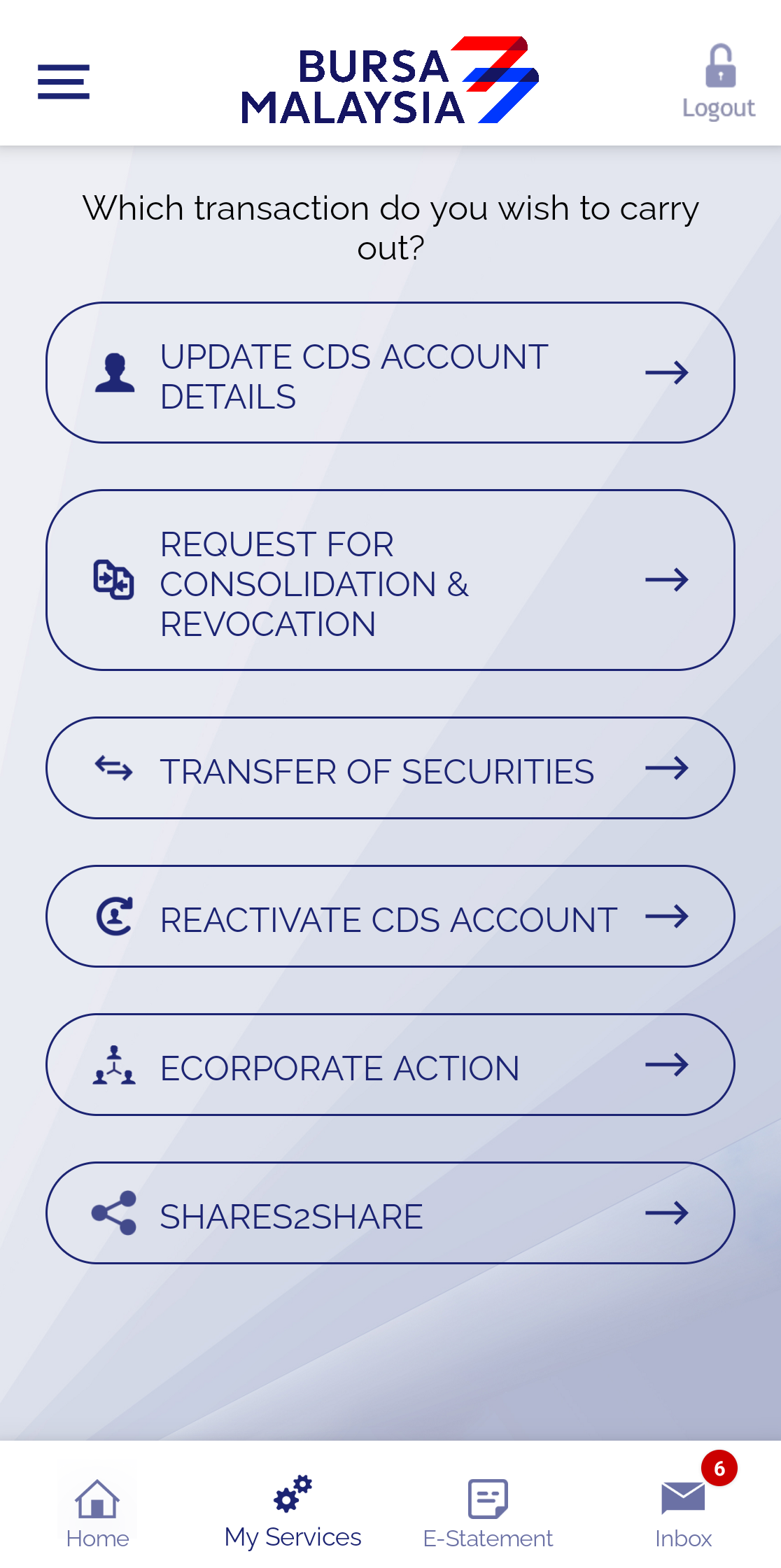
Step 2: Open My Services → Reactivate CDS Account
After logging in, tap the My Services tab at the bottom of the screen, then choose Reactivate CDS Account.
Step 3: Read the Terms and Tap AGREE
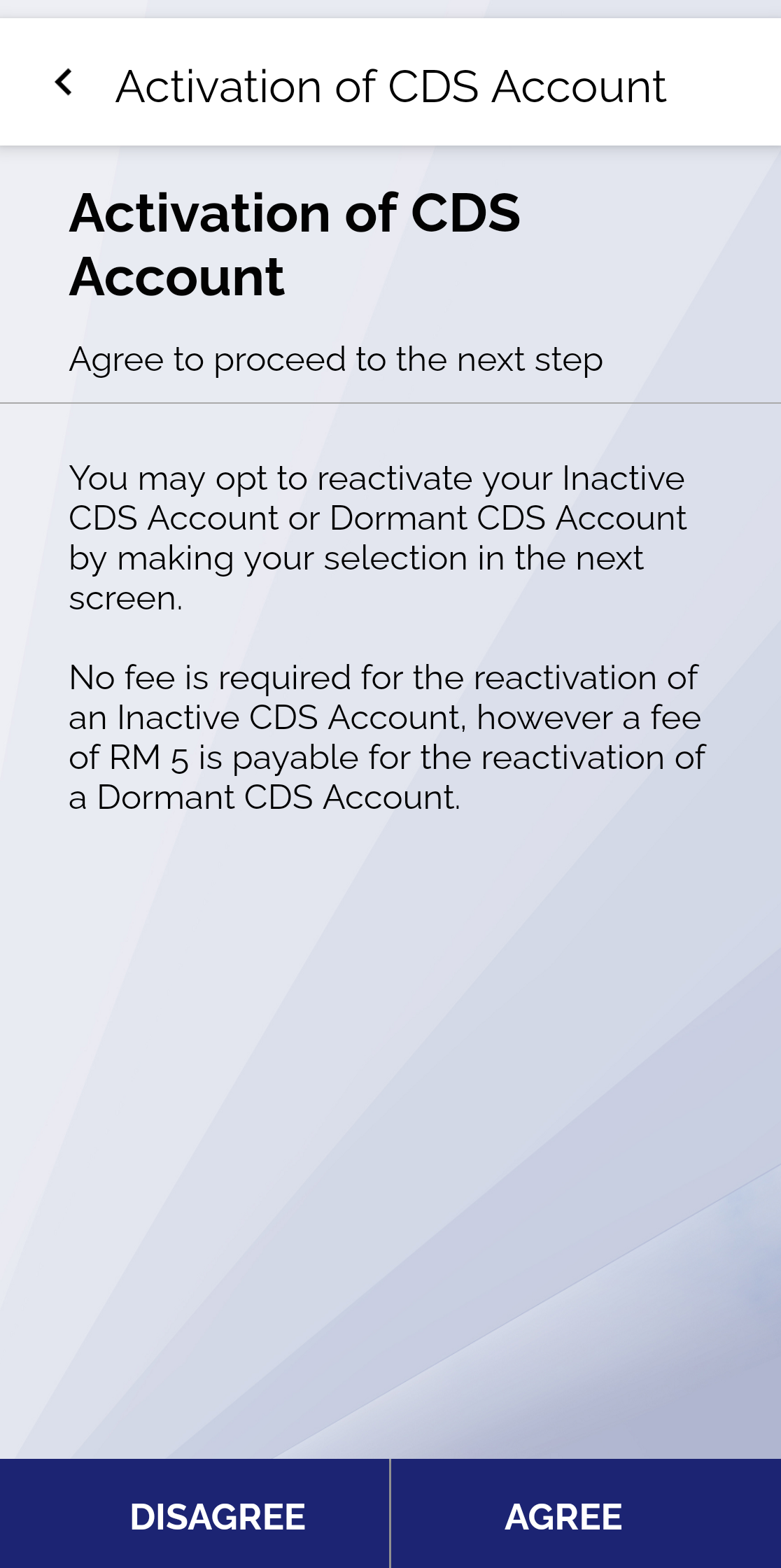
The Activation of CDS Account screen explains that you can reactivate an Inactive or Dormant account on the next screen: Inactive accounts are free, Dormant accounts carry an RM5 fee. Tap AGREE to continue.
Step 4: Select the CDS Account to Reactivate
Select the CDS account with Inactive or Dormant status. If you have several CDS accounts with different brokers, make sure you pick the right one — for example the account under MALACCA SEC (M+) if you are a Mahersaham client.
Step 5: Pay the RM5 Fee (Dormant Accounts Only)
For a Dormant account, pay the RM5 fee directly to Bursa Depository through FPX (online banking). Inactive accounts pay nothing.
Step 6: Your Account Is Active Again
Reactivation through the app takes effect immediately, and Bursa Depository will send you a notice that your account has been successfully reactivated. You can then log in to your trading platform and trade as usual.
Still can't trade after your CDS is active? Your trading account on the broker's side may need to be checked separately. Mahersaham clients can contact @mahersahamplatform on Telegram for help.
Alternative: Reactivate Through Your Broker
If you prefer not to use the app, your CDS account can also be reactivated through the broker (ADA/stockbroking company) where your CDS account was opened:
- Fill in the Application for Reactivation of CDS Account form (downloadable from the Bursa Malaysia website), or send a written request to your broker
- You do not need to be present at the broker's office
- The broker must reactivate the account within 2 market days from the date of your application
- The RM5 fee still applies to Dormant accounts
CDS accounts owned by a company (body corporate) must be reactivated through the broker, with the form signed by the authorised signatories named in the board resolution. Mahersaham clients can contact @mahersahamplatform for help preparing the request.
How to Stop Your Account Going Inactive or Dormant
- Make sure there is at least one transaction in your CDS account every 3 years — for example buying or selling shares, or a share transfer
- When you receive the notice from Bursa Depository (one month before the status changes), make any CDS transaction before the effective date stated in the notice
- Keep the address, email and phone number in your CDS records up to date so the notice reaches you — update them via Update Your CDS Account Using Bursa Anywhere
- Check the status of all your CDS accounts in the Bursa Anywhere app from time to time
Bursa Anywhere vs the M+ App
Many people confuse these two apps. In short:
- M+ app (M+ Online / M+ Global) — for trading: buying and selling shares through your broker
- Bursa Anywhere app — for managing your CDS account directly with Bursa Malaysia: reactivating accounts, updating details, checking holdings across all brokers, CDS statements, share transfers and corporate actions
For a full map of every function in Bursa Anywhere, read Get to Know the Bursa Anywhere App: A Full Map of Every Screen & Function.
Frequently Asked Questions (FAQ)
How long before a CDS account becomes dormant?
A CDS account becomes Dormant when its share balance is nil and there has been no transaction for at least 36 consecutive months after the balance became nil. If it still holds shares but has had no transactions for 36 months, the status is Inactive.
How much does it cost to reactivate a dormant CDS account?
RM5 for a Dormant account, paid via FPX in the Bursa Anywhere app. Inactive accounts can be reactivated for free.
How long does CDS account reactivation take?
Through the Bursa Anywhere app, it takes effect immediately. Through a broker, the broker must reactivate the account within 2 market days from the date of application.
Do I lose my shares if my CDS account is inactive?
No. Your shares remain in an Inactive account, and you still receive dividends and bonus issues if eligible. You just cannot buy, sell or transfer shares out until the account is reactivated.
My CDS account is dormant. Can I still register for Bursa Anywhere?
Yes. Direct CDS account holders can register for Bursa Anywhere regardless of the account status, then reactivate the account through the Reactivate CDS Account menu.
Can a dormant account still apply for IPOs?
Yes. Inactive and Dormant accounts can still be used to apply for IPOs and corporate actions, but the account status stays the same until you reactivate it.
What is the difference between Bursa Anywhere and the M+ trading app?
Bursa Anywhere is a CDS account management app that works directly with Bursa Malaysia, while the M+ app is for buying and selling shares through your broker.
Conclusion
A CDS account with no transactions for 36 months becomes Inactive (still holds shares) or Dormant (nil balance). Your shares stay safe, and the fastest way to reactivate is through the Bursa Anywhere app: My Services → Reactivate CDS Account → AGREE. Inactive is free, Dormant is RM5, and the account is active immediately.
Don't have a CDS account yet? Open a CDS account with Mahersaham to start investing in shares and get access to exclusive client classes.
New to shares? Download the free Stock Investing Basics Ebook to learn the fundamentals of share investing from zero.
Note: This article is for educational purposes only and is not investment advice or a recommendation to buy or sell any securities. Please do your own research and consult a licensed professional before making any investment decisions.