Get to Know the Bursa Anywhere App: A Full Map of Every Screen & Function (2026)

If you have a CDS account, the Bursa Anywhere app is the easiest way to manage it yourself — directly with Bursa Malaysia, without visiting your broker's office or filling in physical forms. Yet many investors only install the app when they need it (for example, to subscribe to a rights issue), and never realise just how much else it can do.
This article is a complete map of the Bursa Anywhere app (2026) — we walk through every tab and screen one by one with real screenshots, and link to step-by-step guides for each task. One thing to understand from the start: Bursa Anywhere is a CDS account management app, not a trading app — to buy and sell shares you still use your broker's platform, such as M+ Global.
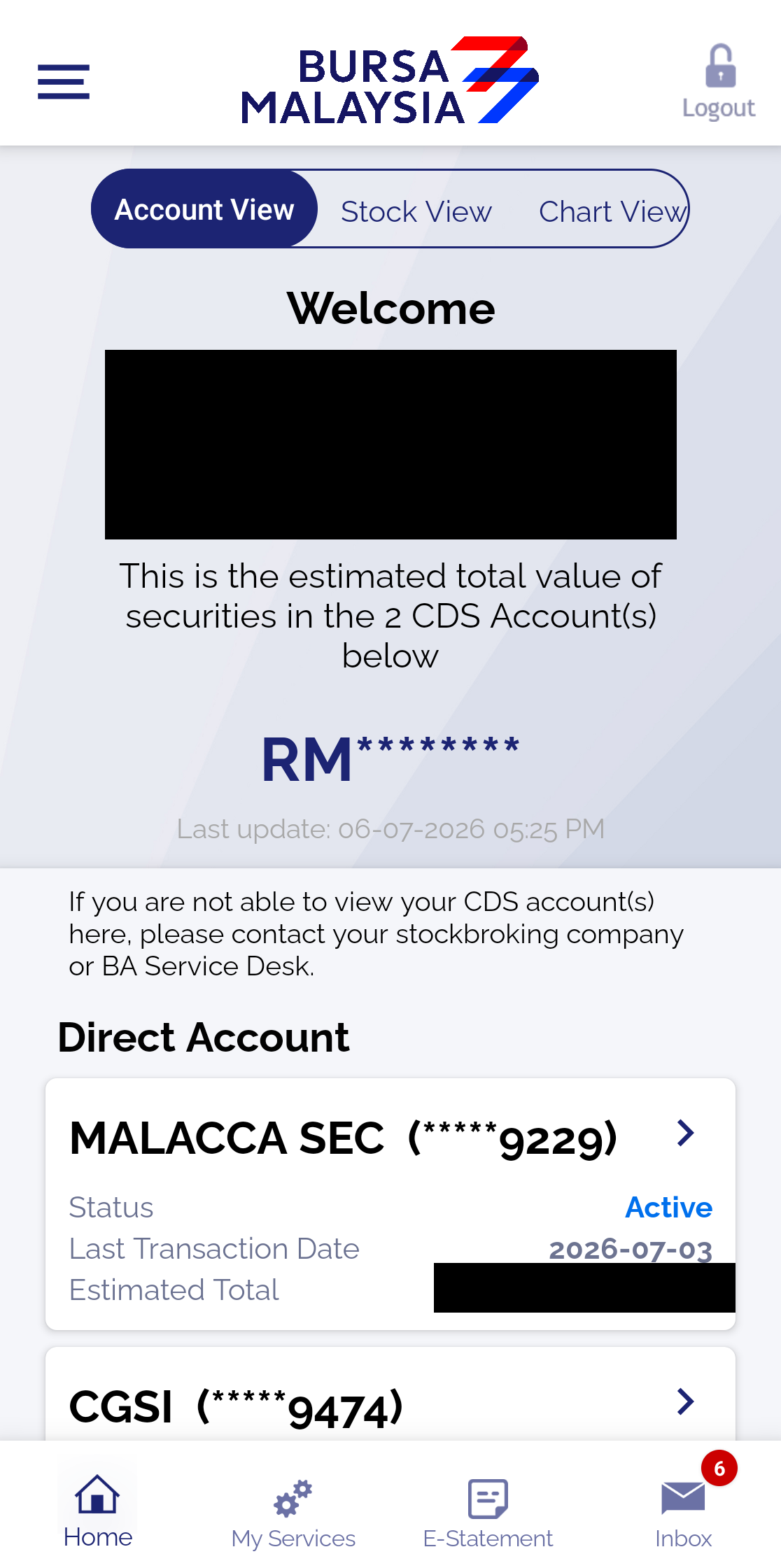
What Is Bursa Anywhere?
Bursa Anywhere is the official mobile app of Bursa Malaysia Depository, giving you direct access to your CDS (Central Depository System) account. Through the app you can view all CDS accounts under your name (even across different brokers), check your shareholdings, download statements, update your personal details, and carry out depository transactions such as share transfers and rights issue subscriptions.
Don't have a CDS account yet? Start with the difference between a Direct CDS and a Nominee account, or open a CDS account through Mahersaham.
The 4 Main Tabs
Navigating Bursa Anywhere is simple — there are just four tabs along the bottom:
- Home — your portfolio summary in 3 views (Account / Stock / Chart)
- My Services — all CDS transactions (update details, transfers, reactivation, corporate actions)
- E-Statement — download your monthly CDS statements (PDF)
- Inbox — official notifications and announcements
Home Tab: 3 Portfolio Views
At the top of the Home screen are three view buttons — Account View, Stock View and Chart View. All three show your holdings from different angles; your total portfolio value is masked (RM********) by default for privacy. We cover all three views in detail in How to Check Your Portfolio & Shareholdings in Bursa Anywhere.
My Services Tab: Your CDS Transaction Hub
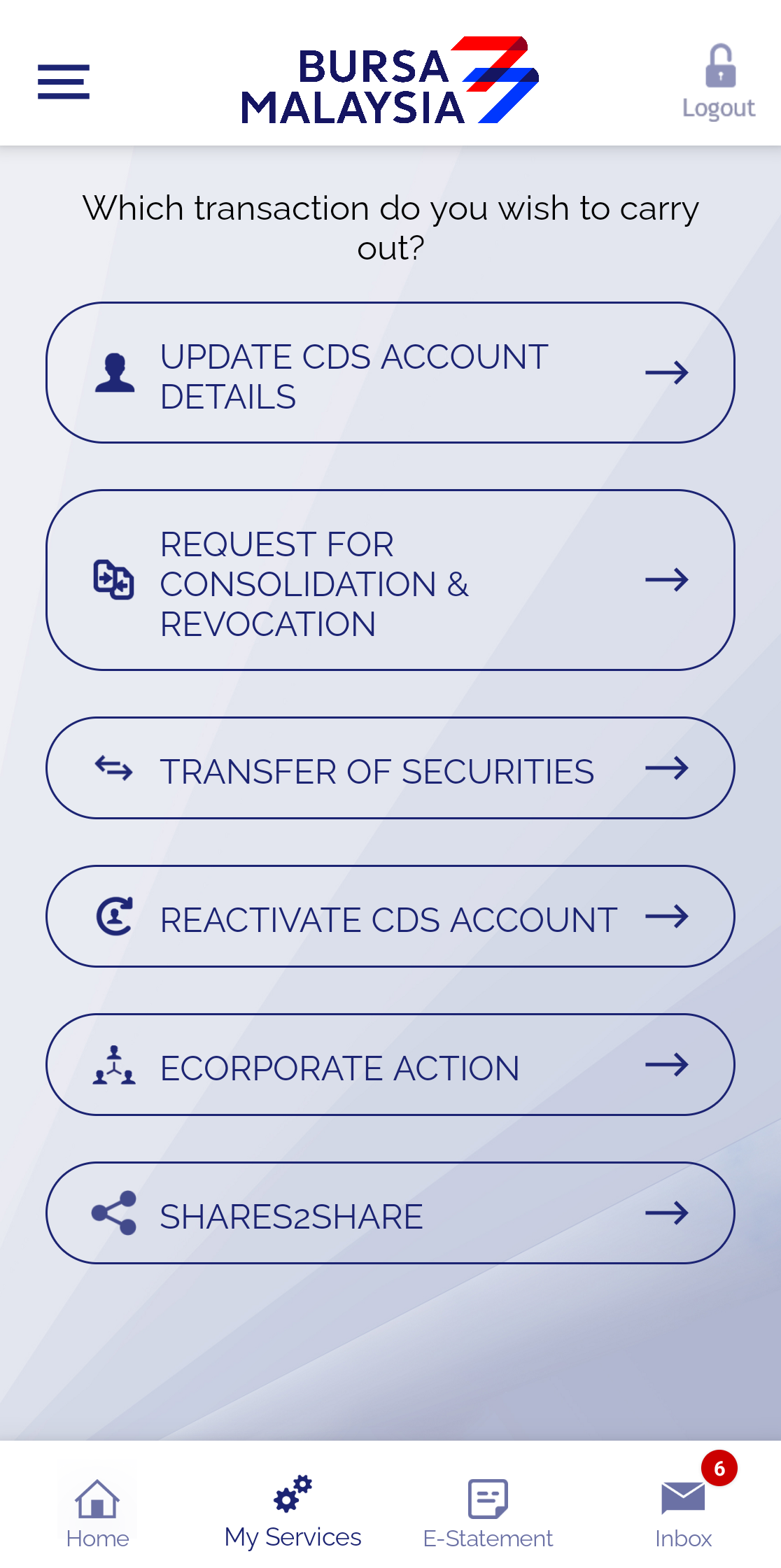
This is the most powerful section. Six transactions are available:
- Update CDS Account Details — update your address, phone number, email and bank details. Note: your correspondence address is updated per account, while the other details are updated across all your CDS accounts at once. Full guides: Update Your CDS Address Using Bursa Anywhere and Updating Your CDS Account.
- Request for Consolidation & Revocation — choose consolidated/unconsolidated statements, or set a single bank account for all cash payments (dividends).
- Transfer of Securities — move shares between your own CDS accounts. Full guide: Transferring Shares Using Bursa Anywhere.
- Reactivate CDS Account — reactivate an Inactive account (free) or a Dormant account (RM5 fee). Full guide: How to Reactivate Your CDS Account With Bursa Anywhere.
- eCorporate Action — subscribe to eRights (rights issues), eGeneral Offer and eDividend Reinvestment Plan online. eRights guide: eRights on Bursa Anywhere.
- Shares2Share — transfer shares to another party (someone else's CDS account).
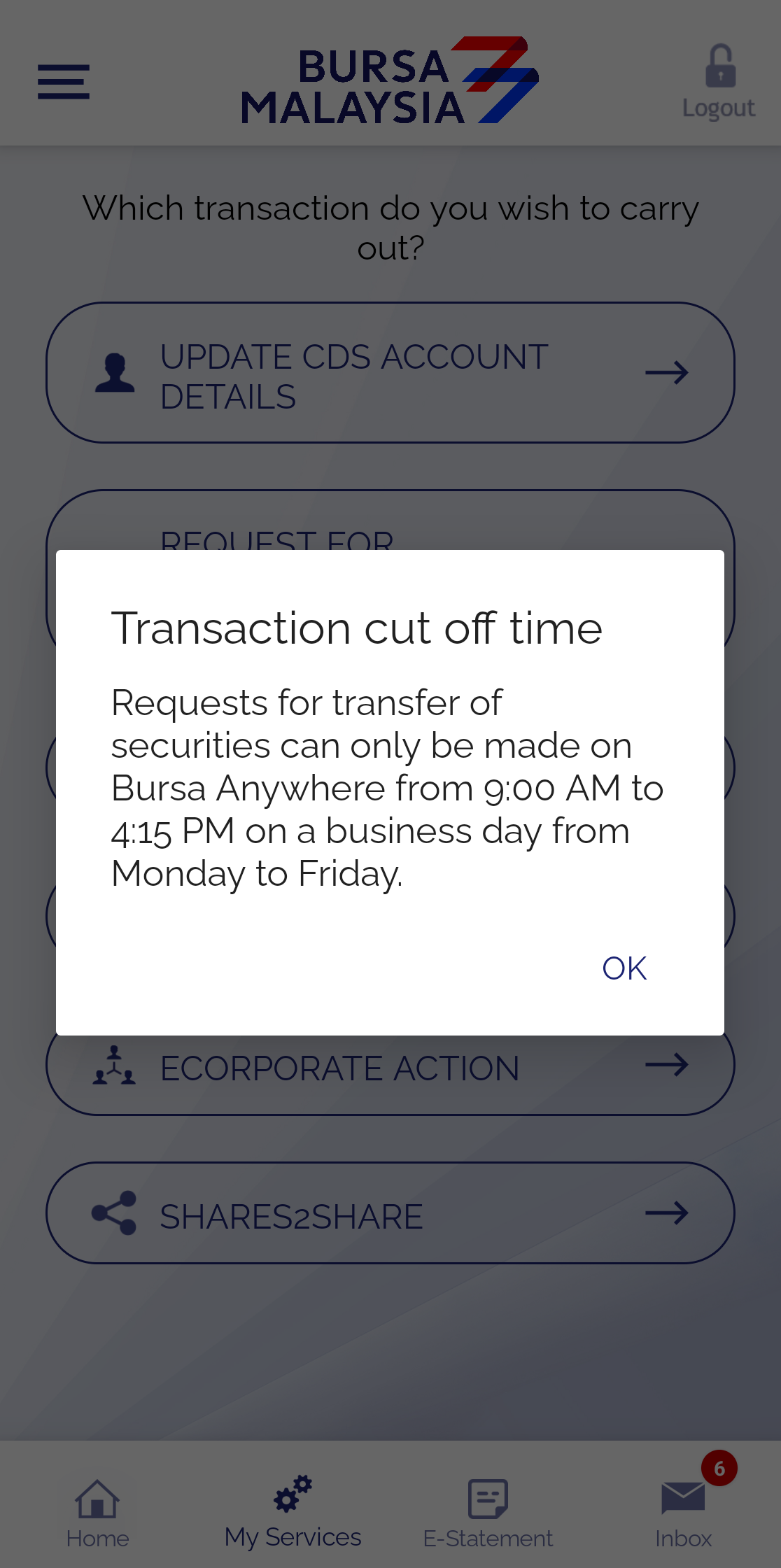
Important — transaction hours: Transfer of Securities and Shares2Share can only be done between 9:00 am and 4:15 pm, Monday to Friday (working days). Outside those hours, the app will show a "Transaction cut off time" dialog.

E-Statement Tab: Your CDS Statements
All your monthly CDS statements are available as PDFs, filterable by account and month. These PDFs are password-protected — the format is the first 2 letters of your name + the last 6 digits of your NRIC. We explain this with an example in How to Open Your Bursa Anywhere E-Statement.
Inbox Tab & the Side Menu
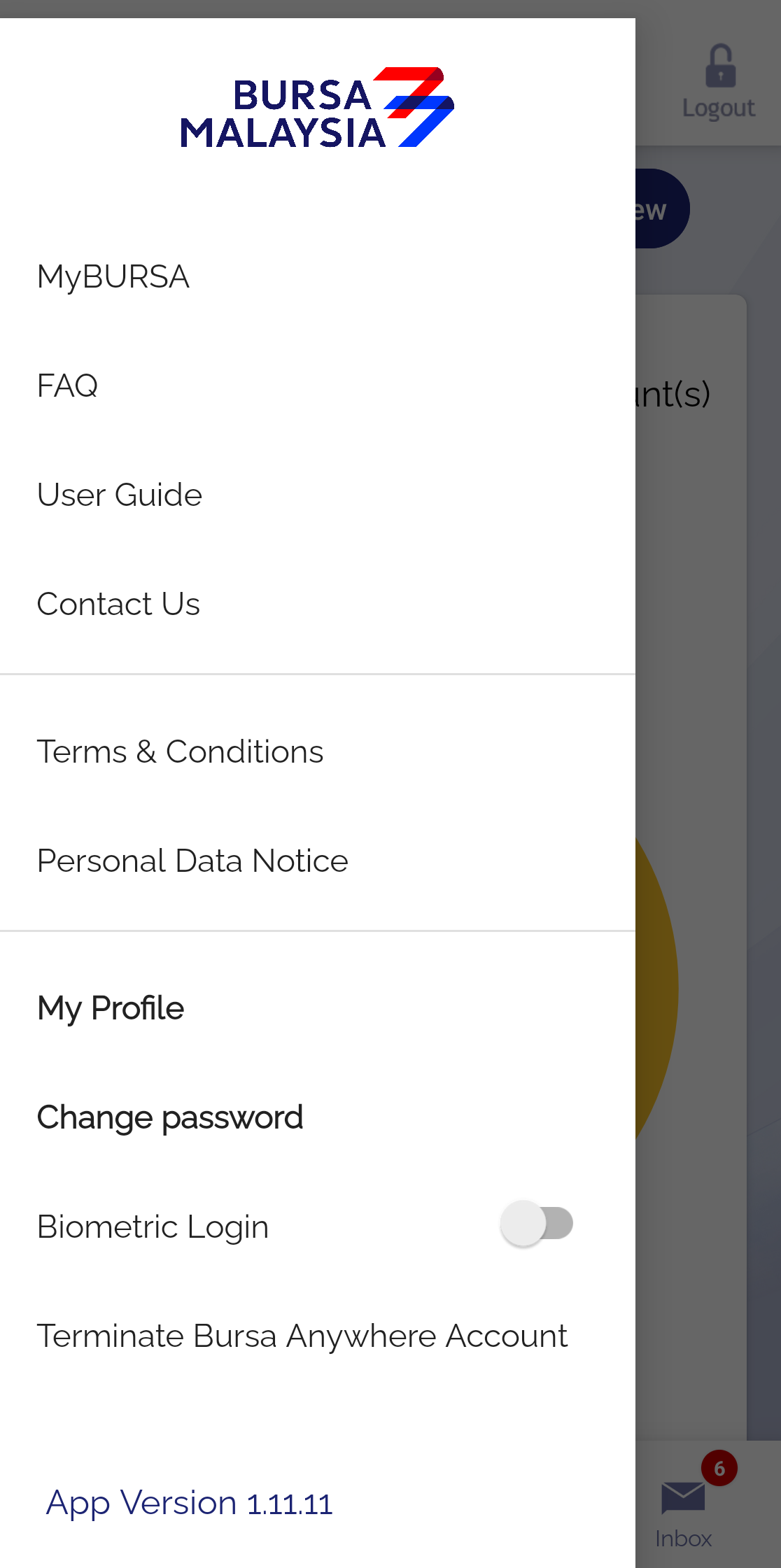
Inbox displays official notifications and announcements from Bursa. The side menu (the ☰ icon in the top-left corner) contains MyBURSA, the FAQ, User Guide and Contact Us, along with key settings: My Profile, Change Password, and a Biometric Login toggle for fingerprint/face login. Forgotten your password? See Forgot Your Bursa Anywhere Password? Here's What to Do.
Frequently Asked Questions (FAQ)
Can I buy and sell shares with Bursa Anywhere?
No. Bursa Anywhere is a CDS (depository) account management app. To buy and sell shares, use your broker's platform — for example, the M+ Global app.
Why does my portfolio total show as RM********?
That's the app's default privacy feature — the full value is masked so it isn't exposed to people around you. Your detailed holdings are still visible in the table below it.
I have CDS accounts with several brokers. Will I see them all?
Yes. All Direct CDS accounts under your NRIC appear in a single app, regardless of broker. To review your account list, see also Check Your Existing CDS Accounts.
Do transactions in Bursa Anywhere incur charges?
Most functions are free. The paid ones include Dormant account reactivation (RM5) and certain transfers/transactions under Bursa's fee schedule. Check the confirmation screen before you submit.
Conclusion
Bursa Anywhere puts full control of your CDS account at your fingertips — check your portfolio, download statements, update your details, transfer shares and handle corporate actions, all without physical forms. Get to know its four main tabs, and use the dedicated guide links above whenever you need to carry out a specific task.
Don't have a CDS account to get started? Open a CDS trading account through Mahersaham to invest in Bursa Malaysia shares as well as foreign markets such as the US and Hong Kong.
New to shares? Download the free Stock Investing Basics Ebook to master the fundamentals before you start trading.
Note: This article is for educational purposes only and is not investment advice or a recommendation to buy or sell any securities. Please do your own research and consult a licensed professional before making any investment decisions.