Check Your MITI IPO Application Status: MySaham, Payment Instruction & the Moratorium

You have submitted your Bumiputera Special Share application on the SahamOnline MITI portal — now what? When will the results come out? How do you know whether you were successful or not? And what must you do if you are successful (so that you do not get hit with a moratorium)?
This article explains the MySaham menu — where the status of every application you make is recorded — as well as the results process, the Payment Instruction (Arahan Pembayaran), and the moratorium rule that catches many investors out.
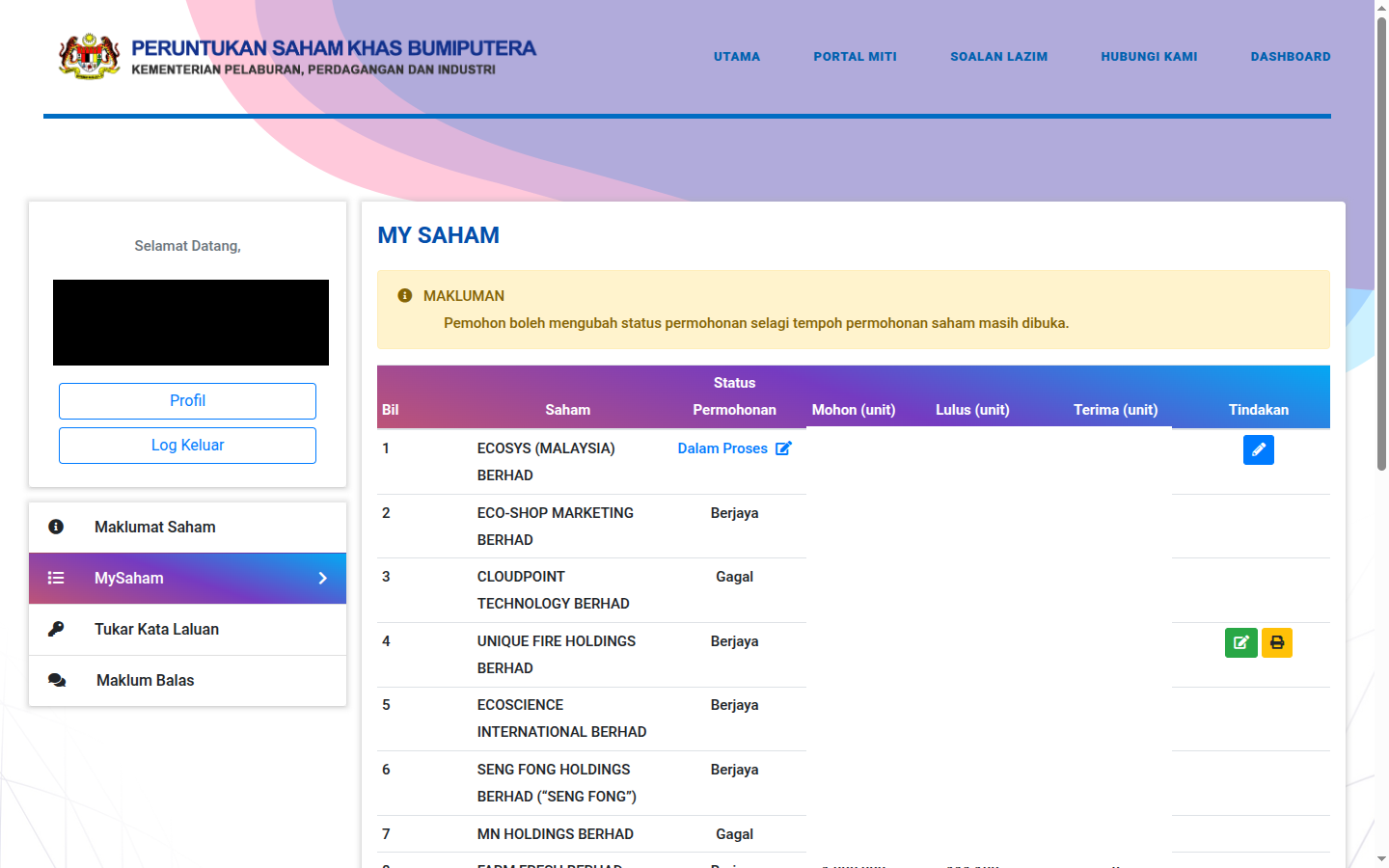
How to Read the MySaham Table
After logging in, open the MySaham menu. Each row is one application, with the following columns:
- Saham (Share) — the name of the IPO company you applied for.
- Application Status:
- Dalam Proses (In Process) — your application has been received and is being assessed by MITI. The pencil icon at the end of the row lets you amend or cancel the application as long as the application period is still open.
- Berjaya (Successful) — you have been allocated shares. Action is required (see Payment Instruction below).
- Gagal (Unsuccessful) — the application was not successful. No action is required.
- Mohon (Applied) units — the total number of units you applied for.
- Lulus (Approved) units — the total MITI approved. This is often less than what you applied for, depending on demand.
- Terima (Accepted) units — the total you confirmed accepting and paid for.
- Tindakan (Action) — the update (green) and print (yellow) buttons for successful applications.
When Are the Results Released?
Results are announced through the portal within approximately 40 working days after the application closing date (subject to amendment by MITI). A "Results Checking Now Open" announcement for the relevant IPO will appear on the portal's main page, and the status in your MySaham will change.
Keep in mind: MITI's decision is final — no appeals will be entertained.
Successful? Here Are the Payment Instruction Steps
If your status is Berjaya (Successful), you need to confirm your acceptance and obtain the Payment Instruction (Arahan Pembayaran):
- Step 1: On the relevant application row, click the green Kemaskini (Update) button.
- Step 2: Enter the number of share units you are accepting.
- Step 3: Save, then press the Pencetak (Print) button to generate the Payment Instruction.
- Step 4: Make full payment according to that instruction before the stated deadline.
Moratorium Warning: Accept ALL Approved Units
This is the most important part of this article. The Moratorium is a restriction that bars you from applying for any Bumiputera Special Share offer for 180 days after the payment deadline of the shares allocated to you. It has been in force since 1 February 2023 and applies if you:
- Fail to make full payment within the stipulated period, OR
- Accept fewer units than the number approved.
An official example from MITI's own FAQ: you apply for 10,000 units, MITI approves 5,000 units — but you only take up 3,000 units. Even though you pay for those 3,000 units, you are still subject to the moratorium because you did not take up the full 5,000 approved units.
The lesson: apply according to what you can genuinely afford. Do not apply for a large amount just to boost your chances — if it is approved and you cannot afford to take it all, you not only lose that opportunity, you are also barred for 180 days from the next offer.
Checking for New Offers: Maklumat Saham
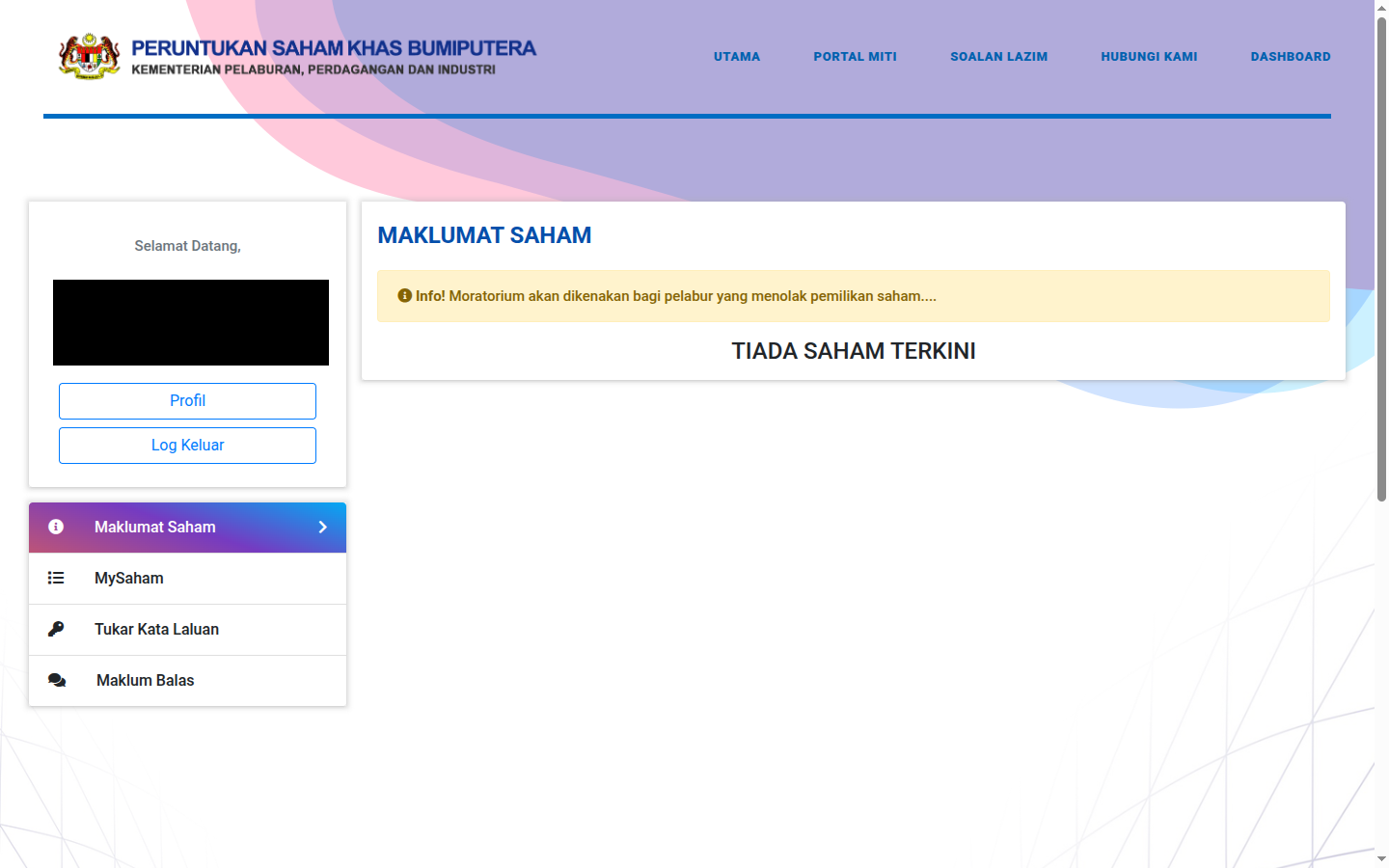
The Maklumat Saham (Share Information) menu displays offers that are currently open, along with an apply (MOHON) button. The portal also displays the moratorium reminder here. If there is no active IPO, you will see "TIADA SAHAM TERKINI" (no current shares) — check back from time to time, or watch for announcements on the portal's main page.
Frequently Asked Questions (FAQ)
How long after the application closes are the results announced?
Approximately 40 working days after the closing date, subject to amendment by MITI. Check MySaham and the portal's main page.
Why were fewer units approved than I applied for?
Allocation depends on overall demand and MITI's assessment. Looking at real examples, large applications are often only partially approved — that is perfectly normal.
Can I decline part of the allocation and accept the rest?
Technically the Kemaskini (Update) button lets you enter the amount you accept — but accepting fewer units than were approved will trigger the 180-day moratorium. Accept the full amount, or be prepared for that restriction.
My status is still "Dalam Proses" (In Process) but I want to change the number of units. Can I?
Yes, as long as the application period for that share offer is still open — click the pencil icon on the application row. After the closing date, amendments are not allowed.
Where do the shares I accept go?
Into the CDS account registered in your profile. You can check your holdings via the Bursa Anywhere app or your broker's platform, and sell them after listing through a broker such as M+ Global.
Conclusion
MySaham is the control centre for your MITI IPO applications — the Dalam Proses (In Process)/Berjaya (Successful)/Gagal (Unsuccessful) statuses, units applied vs approved vs accepted, and the Payment Instruction buttons. Two golden rules: apply within your means, and if you are successful, take up all the approved units and pay in full before the deadline — because failing to do so means a 180-day moratorium from the next offer.
Don't have a CDS account to get started yet? Open a CDS trading account through Mahersaham to invest in Bursa Malaysia shares as well as foreign markets such as the US and Hong Kong.
New to shares? Download the free Basic Share Investment Ebook to master the fundamentals before you start trading.
Note: This article is for educational purposes only and is not investment advice or a recommendation to buy or sell any shares. Terms and procedures are subject to change by MITI; please refer to the official portal for the latest information. Do your own research before making any investment decision.
Further Reading
- Get to Know the SahamOnline MITI Portal: A Complete Guide
- How to Register a SahamOnline MITI Account
- How to Apply for a MITI IPO as a Bumiputera
- How to Check Your Portfolio in Bursa Anywhere