Mahersaham Trading Plans: Track Your Entry, Target & Stop Loss

What Are Trading Plans?
Trading Plans is a feature on mahersaham.com that lets you record every trading plan in a structured format - complete with entry price, target price, and stop loss. It is not just a simple note. It is a personal risk management system that automatically calculates your win rate, risk-reward ratio, and overall performance.
Many investors make costly mistakes because they have no written record. They buy stocks based on "gut feeling", forget their entry price, and have no idea when to sell. Trading Plans solves this problem by giving you one place to plan before you buy, and track after you buy.
This feature is available for Gold Members on mahersaham.com. Besides recording your own plans, you can also view Community Plans - trading plans shared by other members for learning purposes.
Where to Find Trading Plans
Trading Plans can be accessed through the sidebar menu on mahersaham.com. Follow these steps:
- Log in to mahersaham.com with your Gold account
- Click the menu icon (hamburger) on the top left
- Find Trading Plans in the menu list
- Click to open your Trading Plans page
Once opened, you will see the heading "Trading Plans" with the subtitle "Manage your trading strategies and view community plans". At the top, your trading nickname is displayed along with a "Change Nickname" button if you want to update your display name.
My Plans Tab - Your Personal Trading Plans
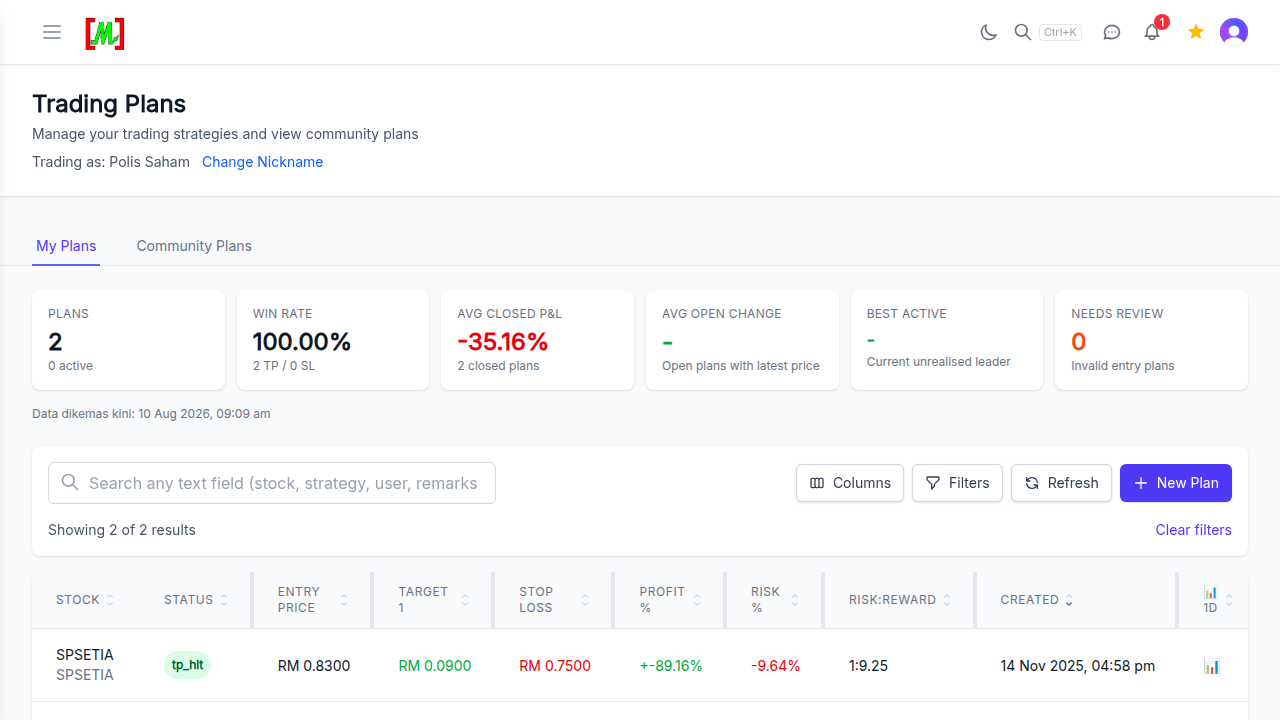
The first tab you will see is My Plans. This is where all your personal trading plans are stored. Every plan you create appears in a table with full details - from the stock name, status (active, tp_hit, sl_hit), entry price, target, stop loss, all the way to the risk-reward ratio.
For example, if you create a plan for SPSETIA with entry RM 0.83, target RM 0.90, and stop loss RM 0.75, the system will automatically calculate that your profit potential is +8.43%, risk is -9.64%, and your risk-reward ratio is 1:0.87. When the price hits the target or stop loss, the plan status will automatically change to tp_hit (target price hit) or sl_hit (stop loss hit).
The system also provides a mini 1D chart next to each plan. This small chart gives you a quick visual of recent price movement without needing to navigate to another page.
6 Key Statistics in the Dashboard
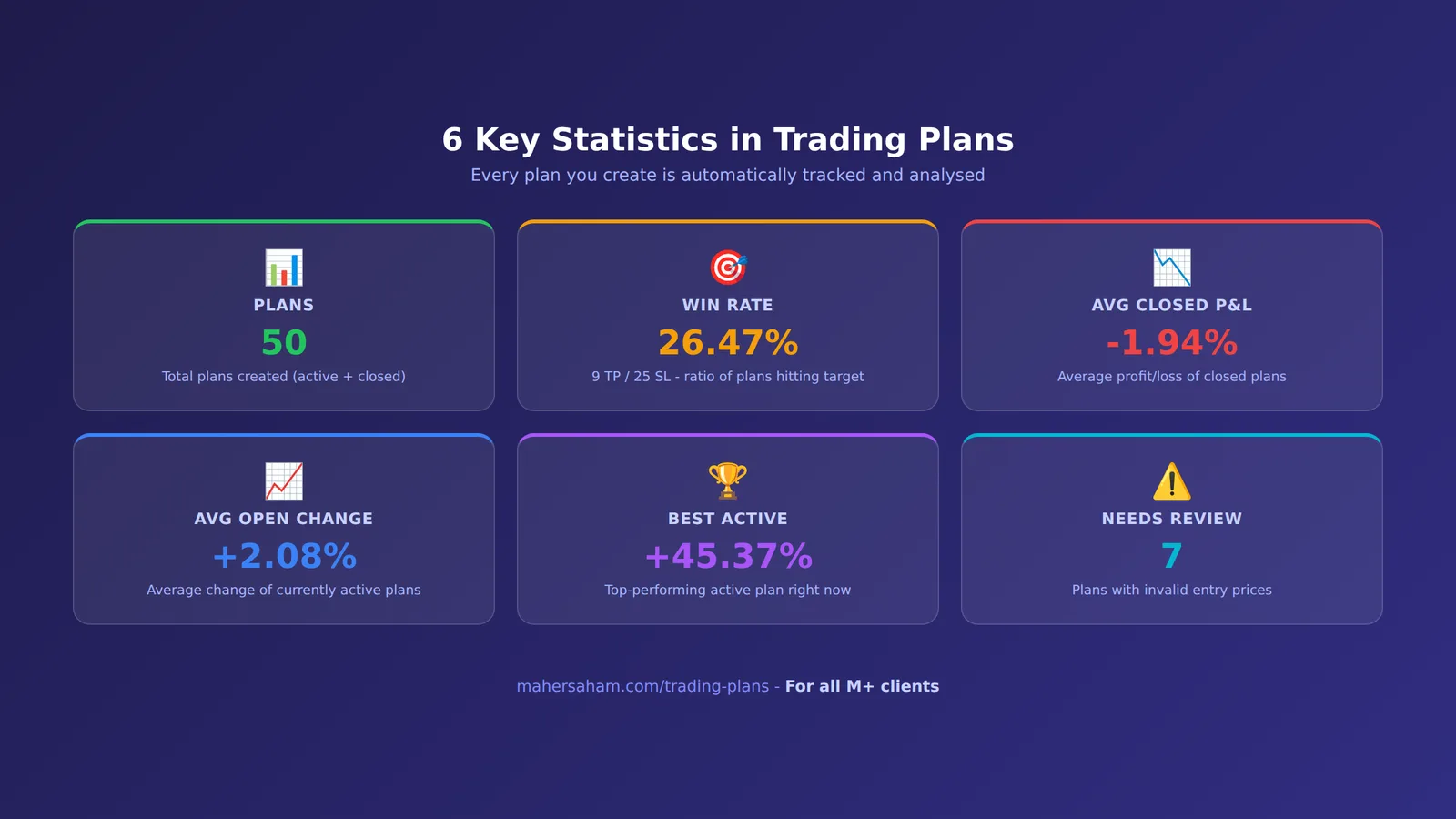
At the top of the Trading Plans page, a statistics dashboard gives you an overview of your overall trading performance. Here are the 6 key metrics you need to understand:
1. PLANS
The total number of your trading plans, including how many are still active. Example: "2 (0 active)" means you have 2 plans but none are still running - both have been closed either by hitting the target price or stop loss.
2. WIN RATE
The percentage of plans that successfully hit their target versus those that hit stop loss. It is calculated as TP / (TP + SL). Example: "100.00% (2 TP / 0 SL)" means both your plans were successful. A healthy win rate for most traders is typically between 40% and 60%, depending on the risk-reward ratio.
3. AVG CLOSED P&L
The average profit or loss for all closed plans. This takes into account both successful and failed plans. It gives you a realistic picture of whether your strategy is profitable overall or not.
4. AVG OPEN CHANGE
The average price change for plans that are still active (open plans). If you have 3 active plans and they are all up an average of +5%, this number will show +5%. It helps you monitor your open portfolio at a glance.
5. BEST ACTIVE
The active plan showing the best performance right now - the highest unrealised gain. Example from Community Plans: "0366 +45.37%" means the stock coded 0366 is currently up 45.37% from its entry price. This helps you identify the "winner" in your open portfolio.
6. NEEDS REVIEW
The number of plans that have issues and need to be reviewed. This includes plans with invalid entry prices, illogical targets or stop losses, or incomplete data. If this number is above 0, check and fix the problematic plans.
Community Plans Tab - Learn From Other Investors
The second tab in Trading Plans is Community Plans. Here, you can view trading plans shared by other mahersaham.com members. This is the best way to learn how other investors plan their trades.
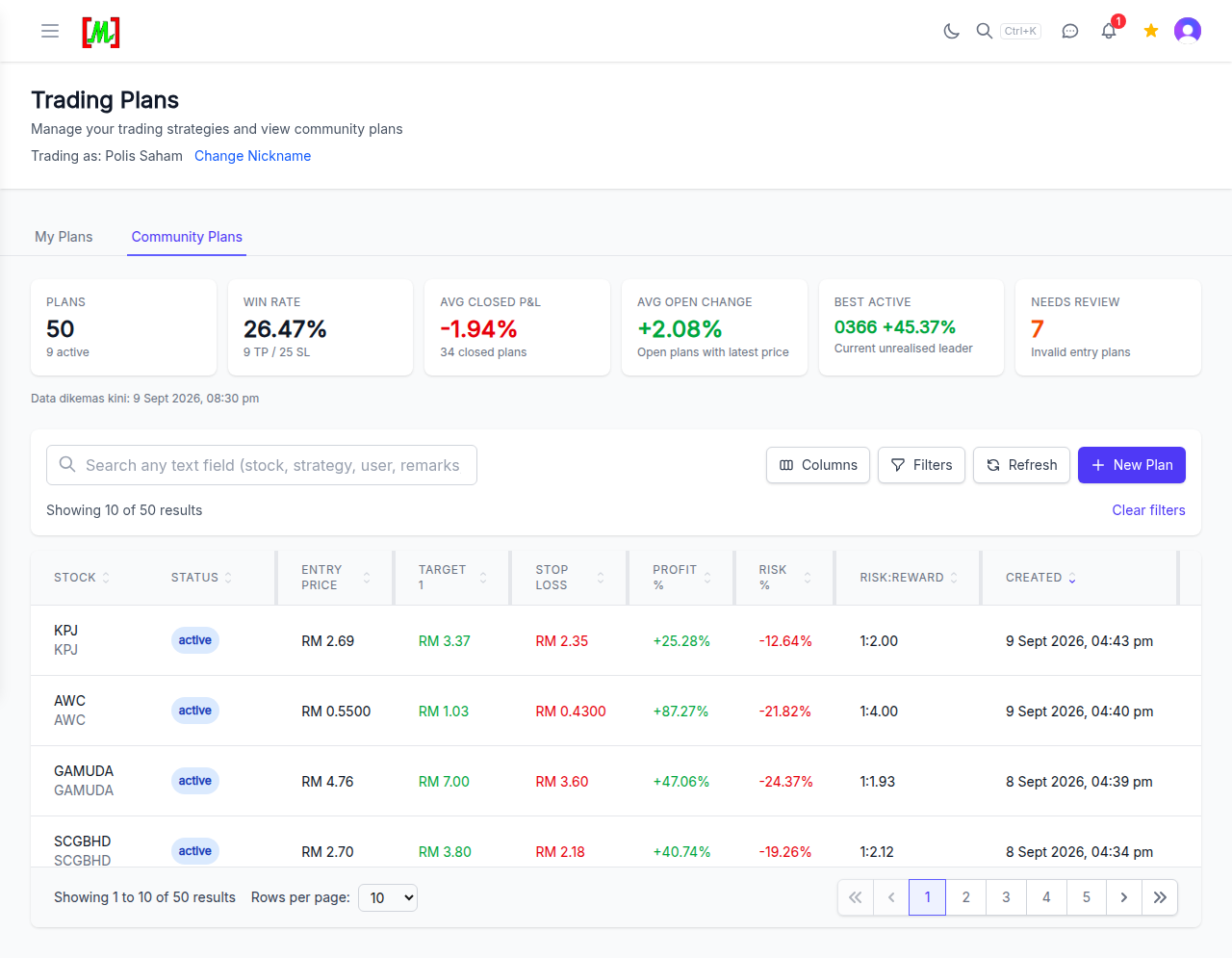
In the example above, Community Plans shows 50 plans in total with 9 still active. The community win rate is 26.47% (9 TP / 25 SL), with an average P&L for closed plans of -1.94%. Interestingly, the average change for active plans is +2.08%, and the best active plan is stock code 0366 with a gain of +45.37%.
Some of the active plans visible include:
- KPJ - Entry RM 2.69, target RM 3.37 (potential +25.28%)
- AWC - Entry RM 0.55, target RM 1.03 (potential +87.27%)
- GAMUDA - Entry RM 4.76, target RM 7.00 (potential +47.06%)
- SCGBHD - Entry RM 2.70, target RM 3.80 (potential +40.74%)
You can study why they chose these stocks, where they placed their targets and stop losses, and what their risk-reward ratios look like. These are not buy or sell recommendations - they are learning material for you to improve your own strategy.
How to Create a New Plan
To create a new trading plan, follow these steps:
- Click the "+ New Plan" button at the top right of the Trading Plans page
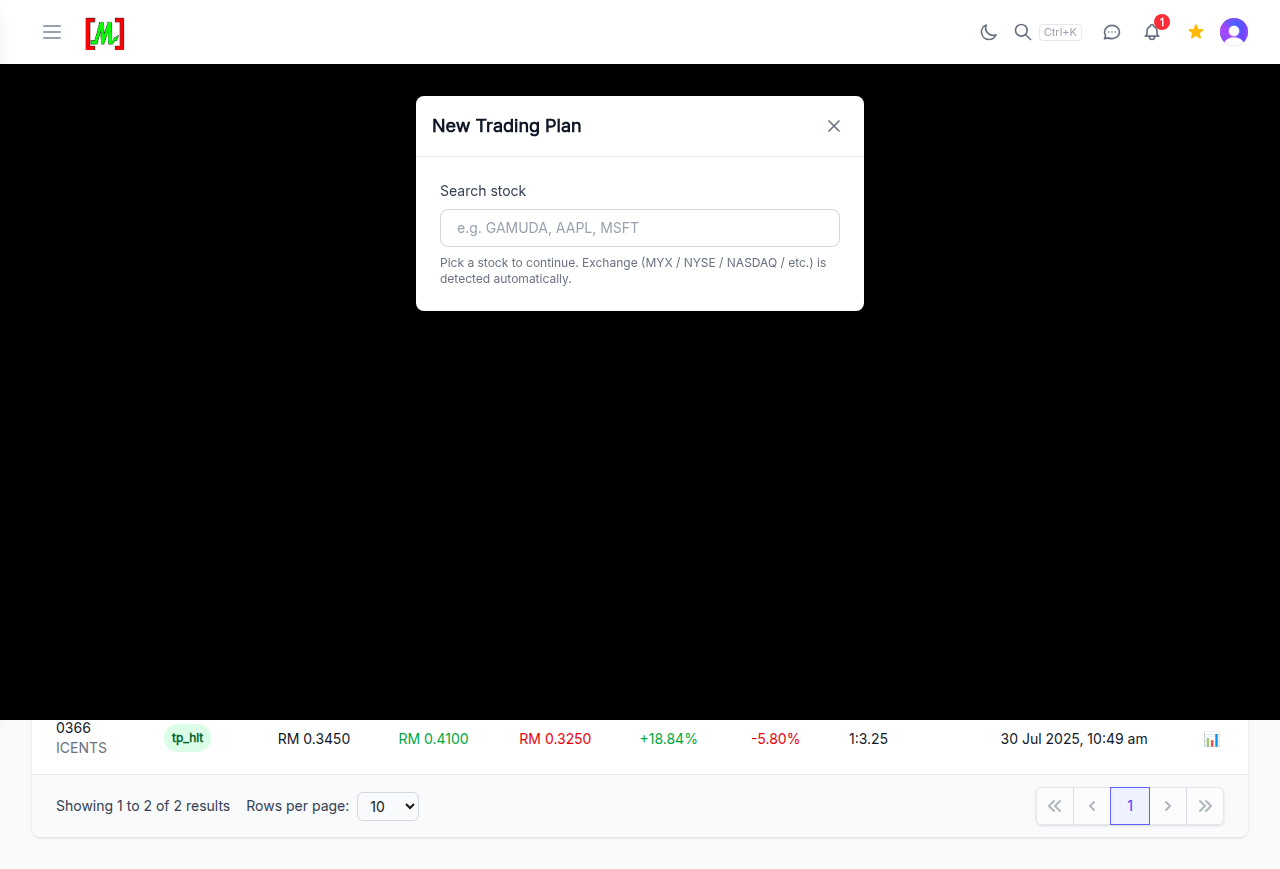
- A "New Trading Plan" modal will appear with a stock search field
- Type the stock name or code - for example "GAMUDA", "AAPL", or "MSFT"
- The system will automatically detect the exchange (MYX / NYSE / NASDAQ / etc.)
- Select the desired stock from the suggestion list
- Enter the Entry Price - the price you plan to buy at
- Enter the Target Price - your take-profit price
- Enter the Stop Loss - your cut-loss price
- Click Save to save your plan
Once saved, the system will automatically calculate the risk-reward ratio, profit percentage potential, and risk percentage. Your plan will also appear in the My Plans table with an "active" status.
What makes mahersaham Trading Plans special is that it supports not only Bursa Malaysia stocks, but also international stocks from NYSE, NASDAQ, and other exchanges. So you can plan trades for Apple, Tesla, or any global stock all in one place.
Important Columns in the Table
The Trading Plans table contains several columns you need to understand:
- STOCK - The name or code of the stock you plan to trade
- STATUS - The current state of the plan: active (still running), tp_hit (target reached), or sl_hit (stop loss reached)
- ENTRY PRICE - The entry price you set when creating the plan
- TARGET 1 - The first target price for taking profit
- STOP LOSS - The cut-loss price - if the price falls to this level, the plan is considered failed
- PROFIT % - The potential profit percentage from entry to target
- RISK % - The risk percentage from entry to stop loss
- RISK:REWARD - The ratio between risk and reward. Example: 1:9.25 means every RM 1 of risk has the potential to yield RM 9.25 in reward. Generally, the recommended minimum ratio is 1:2
- CREATED - The date the plan was created
- Chart 1D - A mini daily chart showing the stock's recent price movement
You can also use the Columns button to choose which columns to display, Filters to filter plans by specific status, and Search to find a specific stock.
Tips for Using Trading Plans Effectively
Here are some tips to maximise the benefits of Trading Plans:
- Create the plan BEFORE you buy - Do not create a plan after you have already purchased. The purpose of a plan is to prepare before acting so that decisions are made rationally, not emotionally
- Set a realistic stop loss - A stop loss that is too tight will trigger frequently even when your trade direction is correct. One that is too loose will lead to large losses. Place it at a logical technical support level
- Target a minimum 1:2 risk-reward ratio - This means your potential profit should be at least twice your potential loss. With this ratio, you can still be profitable even with a win rate of only 40%
- Review your win rate regularly - The statistics dashboard gives you a clear picture of your performance. If your win rate is too low, review your stock selection strategy and stop loss placement
- Learn from Community Plans - See how other members place their targets and stop losses. Notice the differences between successful and failed plans
- Do not modify plans after creation - Discipline is key. If you constantly change your target or stop loss after the price moves, you will never be able to measure the true effectiveness of your strategy
- Use alongside Screener and Watchlist - The ideal workflow: use the Screener to discover stocks, add them to your Watchlist to monitor, and create a Trading Plan when you are ready to act
Frequently Asked Questions (FAQ)
Are Trading Plans free for all users?
No. Trading Plans is an exclusive feature for Gold Members on mahersaham.com. You need to subscribe to the Gold plan to access this feature along with other premium features like Custom Screener and Watchlist.
Can I record international stocks in Trading Plans?
Yes. Trading Plans supports stocks from multiple exchanges including Bursa Malaysia (MYX), NYSE, NASDAQ, and others. The system will automatically detect the exchange when you search for a stock.
What is the difference between Trading Plans and Trading Plan Game?
Trading Plans is for recording your actual trading plans with real money. The Trading Plan Game is a free simulator that lets you practise creating plans without financial risk. Use the Game to practise, and Trading Plans for real trades.
How does the plan status change automatically?
The system monitors the current market price and compares it against the target price and stop loss you set. When the current price reaches or exceeds the target, the status changes to "tp_hit". When the price falls to or below the stop loss, the status changes to "sl_hit".
Does Community Plans mean I should follow other people's plans?
No. Community Plans is meant for learning purposes only - not as buy or sell recommendations. Use it as a reference to understand how other investors think, and build your own strategy based on your own research.
How many plans can I create?
There is no limit to the number of plans you can create. You can make as many plans as you want for various stocks across different exchanges.
Conclusion
Trading Plans on mahersaham.com is an essential tool for every investor who is serious about risk management and trading discipline. By recording your entry, target, and stop loss systematically, you are not just planning trades better - you can also measure and improve your performance over time.
The statistics dashboard gives you a clear picture of your win rate, average P&L, and best plans. Community Plans opens up opportunities to learn from other investors' strategies. Combine it with Screener and Watchlist for a complete workflow - from stock discovery to trade execution.
Start planning your trades today. Visit mahersaham.com, sign up as a Gold member, and create your first Trading Plan.
Register for free at mahersaham.com to start using Trading Plans, automated Screeners, Watchlist, and 100+ analysis tools for Bursa Malaysia, US, and Hong Kong stocks.
Download our free ebook for a step-by-step guide to investing in the stock market.
Have questions? Contact us via WhatsApp Support for further assistance.
Open Trading Plans now and start tracking your entries and targets.