CDS Account Services on Mahersaham: Password Reset, Market Depth & More

As a Mahersaham client with an existing CDS account, there are times when you need technical assistance for your trading account. Whether you have forgotten your password, your trading pin is blocked, or you want to activate additional features like Market Depth - the CDS Service Request feature on mahersaham.com lets you submit these requests directly through the platform without having to contact support manually.
What Is CDS Service Request?
CDS Service Request is a feature on mahersaham.com that allows clients to submit service requests for their CDS accounts directly through the platform. It works like a support ticket system - you select the type of request, submit it, and our team will process it. You can also track the status of every request you have ever submitted.
This feature is exclusively available to Mahersaham clients who already have a CDS account under M+ Maher Alias. If you do not have a CDS account yet, please register for a Mahersaham account first.
Where to Find CDS Service Request
This feature can be accessed through your Dashboard. Follow these steps:
- Log in to mahersaham.com with your account
- Navigate to your Dashboard via the sidebar menu or profile icon
- Find and click on CDS Service Request or Permintaan Servis Akaun CDS
- You will be taken to the service request form page
At the top of the page, you will see the heading "Permintaan Servis Akaun CDS" along with a brief description explaining that this feature is for all clients who have a Mahersaham CDS account to submit trading account service requests.
6 Types of Requests Available
On the CDS Service Request page, there are 6 types of requests you can select via radio buttons. Each one serves a different purpose:
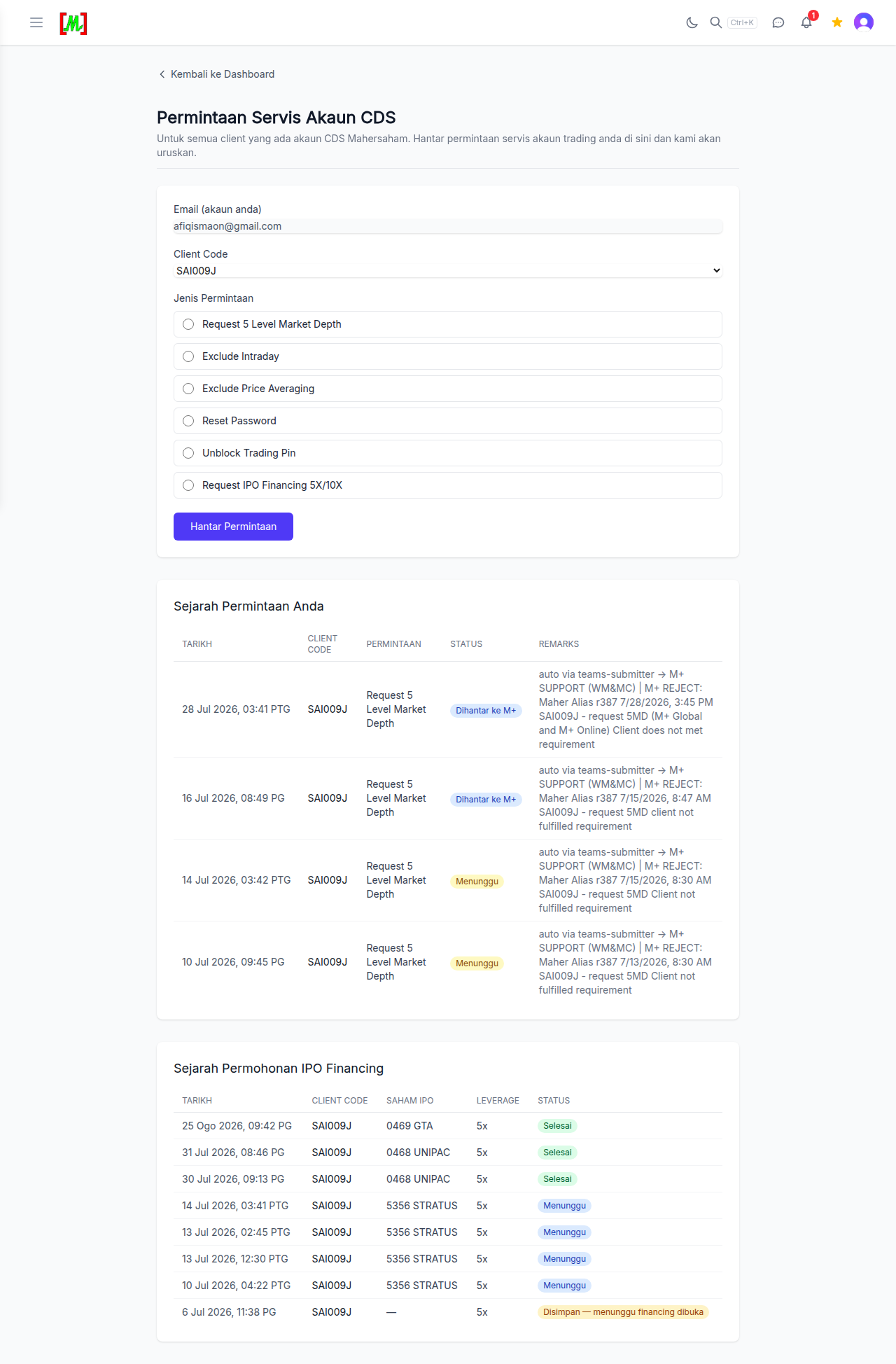
1. Request 5 Level Market Depth
Market Depth displays 5 rows of bid (buyer) and ask (seller) prices in a stock's order book. By default, trading accounts only show 1 level of pricing. By activating 5 Level Market Depth, you can see market depth more clearly - how many buyers and sellers are waiting at each price level, and how many lots are queued.
This is particularly useful for active traders who want to understand buying and selling pressure before making decisions. You can identify whether there is a large bid "wall" at a certain level, or aggressive sellers waiting above.
2. Exclude InfoBip
InfoBip is an SMS service provider used by brokers to send notifications related to your trading account - such as order confirmations, settlement notices, and other alerts. Some clients find these notifications too frequent or unnecessary.
By selecting Exclude InfoBip, you request that SMS notifications from InfoBip be stopped for your account. This does not affect your trading functionality - you can still trade as usual, you simply will not receive those SMS notifications.
3. Exclude Price Ranging
Price Ranging is a Bursa Malaysia mechanism that limits stock price movement within a certain range. When a stock price hits the price ranging limit, some orders may not be executed immediately. Price ranging alerts can be disruptive for some traders.
The Exclude Price Ranging request allows you to manage price ranging alert settings on your account, ensuring a smoother trading experience without unwanted notification interruptions.
4. Reset Password
This is one of the most commonly used requests. If you have forgotten your M+ Online trading account password or cannot log in, select this request type. Our team will process the password reset and notify you through the request status or feedback on the same page.
After the password is reset, you will receive a temporary password and will need to change it during your first login. Make sure to store your new password in a safe place.
5. Unblock Trading Pin
The Trading Pin is an additional security layer required every time you place a buy or sell order. If you enter the wrong pin too many times, your pin will be automatically blocked as a security measure.
When this happens, you cannot make any transactions until the pin is unblocked. Select this request type and our team will unblock your trading pin as quickly as possible so you can resume trading.
6. Request IPO Financing BNYM
This request is specifically for clients who want to apply for IPO financing through BNYM (Bank of New York Mellon). IPO Financing allows you to apply for IPO shares with a larger amount than your own capital - the broker will finance a portion of your application.
This is especially useful during popular IPOs where demand is high and the chances of getting an allocation are slim. With IPO financing, you can apply for more lots to increase your allocation chances. Please ensure you understand the financing terms and conditions before applying.
How to Submit a Request - Step by Step
The process of submitting a service request is straightforward and can be completed in less than 1 minute:
- Open the CDS Service Request page - From your Dashboard, click on CDS Service Request
- Verify your email - Your account email will be displayed automatically (pre-filled). Make sure it is correct
- Enter your Client Code - Type in your CDS client code (e.g., XYZ001A). This client code was provided during your CDS account registration
- Select Request Type - Click the radio button to choose one of the 6 available request types
- Click "Hantar Permintaan" - Click the green button at the bottom of the form to submit
After submitting, your request will be recorded in the system and our team will process it. You can check the status of your request at any time on the same page.
Request History & Status Tracking
Below the request form, there is a table called "Sejarah Permintaan Anda" (Your Request History) that displays all requests you have ever submitted. The table contains the following columns:
- Tarikh (Date) - The date and time the request was submitted
- Client Code - Your CDS client code
- Jenis Permintaan (Request Type) - The type of service requested (e.g., Request 5 Level Market Depth, Reset Password)
- Status - The current status of your request. You can see whether it is still being processed, completed, or requires additional action
- Maklumbalas (Feedback) - Response from the Mahersaham team regarding your request. Here the team will inform you if the request has been completed, or if there are issues that need to be resolved
With this table, you no longer need to ask about request status via Telegram or WhatsApp - everything can be monitored directly on the platform.
IPO Financing Application History
In addition to the general service request table, there is also a dedicated table for "Sejarah Permohonan IPO Financing" (IPO Financing Application History). This table specifically displays all IPO Financing applications you have made, including details such as:
- Client Code - Your CDS client code
- Stock Code - The IPO stock code applied for
- IPO Details - Detailed information about your IPO financing application
This makes it easy to track all your IPO Financing applications in one place, especially if you are actively applying for new IPO stocks on Bursa Malaysia.
Frequently Asked Questions (FAQ)
Is there any charge for using CDS Service Request?
No, this service is provided free of charge to all Mahersaham clients who have a CDS account. You can submit requests without any payment.
How long does it take to process a request?
Most requests such as Reset Password and Unblock Trading Pin are processed within 1 business day. More complex requests like IPO Financing may take longer depending on availability and broker processes.
Can I submit more than one request at the same time?
Yes, you can submit multiple different requests. Each request will be recorded separately in the Request History table and processed one by one by our team.
What should I do if my request status has not changed after several days?
If your request status has not been updated after 2 business days, please contact our support team via Telegram support and include your client code and request type for further investigation.
Do I need Gold Access to use CDS Service Request?
No, CDS Service Request is available to all Mahersaham clients with a CDS account - whether you are a regular member or a Gold member. This feature is related to trading account management, not premium content.
Conclusion
The CDS Service Request feature on mahersaham.com makes managing your trading account easier, more organized and transparent. From password resets to IPO Financing applications, everything can be handled in just a few clicks without having to contact support manually. Use this feature to save time and focus on what matters most - making smart investment decisions.
Register your CDS account today at mahersaham.com and enjoy access to stock screeners, technical analysis, and various investment tools for Bursa Malaysia, US and Hong Kong markets.
Already have an account? Log in and submit your first service request through your Dashboard now.
Need further assistance? Contact our support team at t.me/mahersahamplatform.
Open CDS Service Request now and submit your account service request.
Further Reading
- How to Use Mahersaham - Complete platform usage guide
- Mahersaham Sign Up - Step-by-step CDS account registration
- Mahersaham Gold Access - Learn about Gold member benefits
- Mahersaham Watchlist - How to monitor your selected stocks
- Bursa Dividend Calendar - Never miss important dividend dates