Mahersaham M+ Self-Service Forms: 6 Digital Forms for Your CDS Account

Updating your CDS account details used to be a chore. You had to download a PDF form, print it out, fill it in by hand, scan the completed form, and send it back to your remisier via email or WhatsApp. The process often took days, especially when documents were incomplete or handwriting was illegible. That is now a thing of the past with the M+ Self-Service Forms feature on mahersaham.com.
This feature allows Mahersaham clients with a CDS account under M+ Online (Malacca Securities) to fill out and submit account change forms digitally. Each form comes pre-filled with your existing data, so you only need to update the relevant fields, confirm and submit. No more paper, no more scanning, no more waiting.
What Are M+ Self-Service Forms?
M+ Self-Service Forms is a collection of 6 digital forms available inside your Dashboard on mahersaham.com. They are designed to make it easy for clients to manage changes to their CDS account information. Each form is pre-filled with your current details from the broker's system, so you only need to enter the new information, verify and submit.
This is different from the CDS Service Request feature, which handles technical service requests such as password resets or Market Depth activation. M+ Self-Service Forms are specifically for official account information changes that require broker forms from M+ Online (Malacca Securities).
Before this feature existed, changing your account information involved these steps:
- Contact your remisier to request the correct form
- Download the PDF form from the broker
- Print the form
- Fill it in by hand
- Scan or photograph the completed form
- Send it back via email or WhatsApp
- Wait for confirmation from the broker
With M+ Self-Service Forms, the entire process is reduced to 3 steps: open the form, confirm the new details, and submit. The system automatically generates an official document and sends it to the broker for processing.
Where to Find M+ Self-Service Forms
The feature is located inside your account Dashboard. Here is how to access it:
- Log in to mahersaham.com with your account
- Go to your Dashboard via the sidebar menu or profile icon
- Find and click Borang (Forms) in the Dashboard navigation
- You will be taken to the M+ Self-Service Forms page showing 6 form cards
Each card displays the form name, a brief description and a button to open that form. The clean interface makes it straightforward to pick the right form without scrolling through a long list.
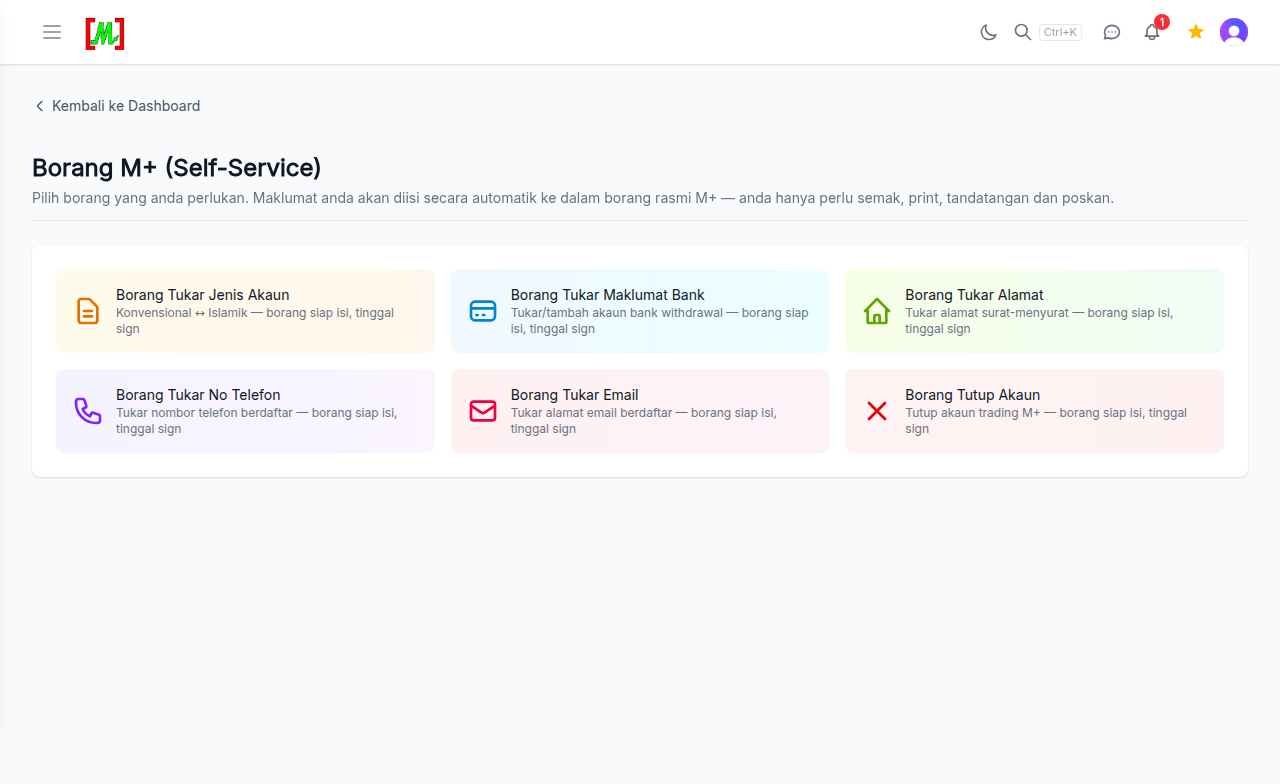
6 Available Forms
Below is a complete list of the 6 forms available on the M+ Self-Service Forms page, with a detailed explanation of each one.
1. Change Account Type (Conventional to Islamic or Vice Versa)
This form allows you to switch your trading account between Conventional and Islamic types. An Islamic account operates under Shariah principles, meaning you will not be charged interest on any transactions. A Conventional account, on the other hand, may involve interest charges for certain facilities such as margin trading.
When to use this form:
- You want to transition to fully Shariah-compliant investing
- You have decided to switch from an Islamic account to a Conventional one for specific reasons
- You have realised that your current account type does not match your investment needs
What to do: Open the form, select your desired new account type, review the pre-filled personal details, and submit. The change typically takes 1-3 business days to be processed by Malacca Securities.
2. Change Bank Details
This form is used to update the bank account linked to your CDS account. Your bank details are important because they determine where proceeds from stock sales or dividends will be credited.
When to use this form:
- You have opened a new bank account and want to use it for receiving stock sale proceeds
- Your old bank account has been closed or is no longer active
- You want to switch to a bank that offers better services
What to do: Open the form and enter your new bank details including the bank name, account number and account holder name. Make sure the account holder name matches the name on your CDS account. The broker may require a copy of your bank statement or passbook as additional verification.
Important note: The bank account must be in the same name as the CDS account holder. Joint accounts or accounts in a third party's name are not accepted.
3. Change Address
This form lets you update the correspondence address recorded in your CDS account. While most communications are now digital, an accurate address is still required for official records and physical document delivery when necessary.
When to use this form:
- You have moved to a new address
- The address on your CDS record has not been updated since the account was first opened
- You want to change your mailing address to your office address
What to do: Open the form and enter your new address in full, including postcode and state. The form will display your old address for reference so you can compare before submitting. You may need to provide supporting documents such as a utility bill or bank statement showing the new address as verification.
4. Change Phone Number
This form is used to update the mobile phone number linked to your CDS account. Your phone number is important for identity verification and communications from the broker.
When to use this form:
- You have changed your mobile phone number
- Your old phone number is no longer active or has been transferred
- You want to use a different number to receive trading account notifications
What to do: Open the form and enter your new phone number. The system will display your existing phone number for comparison. Make sure the new number is active and able to receive calls and SMS, as it may be used for security verification of your trading account in the future.
5. Change Email
This form allows you to change the email address registered with your CDS account. Your email is used by the broker to send account statements, transaction confirmations and other important notifications.
When to use this form:
- You want to switch to an email you check more frequently
- Your old email is no longer in use or is full
- You want to separate your personal email from your investment email
What to do: Open the form and enter your new email address. Double-check that the email is correct because the broker will use it for all official communications including monthly statements and transaction confirmations. A typo in your email address could cause you to miss important information about your trading account.
6. Close Account
This form is used to apply for the closure of your CDS account. This is the final step if you truly want to terminate your trading account entirely.
When to use this form:
- You want to close a CDS account that is no longer in use
- You want to consolidate multiple CDS accounts into one
- You are moving to a different broker and no longer need an account with M+ Online
What to do: Open the form, review your account details, and confirm the closure application. Before submitting this form, make sure:
- There are no shares still held in the CDS account
- There are no transactions still in the settlement process
- There are no outstanding debts or charges on the account
Important note: CDS account closure is permanent and cannot be reversed once processed. If you wish to invest again in the future, you will need to open a new CDS account. Consider carefully before submitting this form.
Benefits of Digital Forms Over Paper Forms
The M+ Self-Service Forms feature offers several clear advantages over the traditional paper form method:
Time savings: The entire process can be completed in just a few minutes, compared to several days for the traditional method that requires printing, filling, scanning and sending.
Fewer errors: Since forms are pre-filled with existing data from the system, the risk of errors in personal details such as IC numbers or client codes is significantly reduced. You only need to enter the new information you want to change.
Digital audit trail: Every form submitted is recorded in the system. You can refer back to it at any time without having to search for paper copies that may have been lost.
24/7 access: You can fill out and submit forms at any time, not limited to office hours. This is particularly useful for investors who work and do not have free time during business hours.
Environmentally friendly: Reduces paper usage in line with sustainable practices. While it may seem small, every digital form that replaces a paper form contributes to reducing our carbon footprint.
What Happens After You Submit a Form?
After you fill out and submit a form through M+ Self-Service Forms, here is the workflow that takes place:
- Document generation: The system generates an official broker-format document based on the information you entered
- Team verification: The Mahersaham team reviews the form and ensures all information is complete and accurate
- Submission to broker: The verified document is sent to Malacca Securities (M+ Online) for processing
- Broker processing: The broker updates your CDS account records based on the application received
- Notification: You will be notified once the change has been processed
Processing times vary by form type. Simple changes like email or phone number updates are usually processed within 1-2 business days. More complex changes like account type switches or account closures may take 3-5 business days.
Who Can Use M+ Self-Service Forms?
This feature is available to all Mahersaham clients who meet the following criteria:
- Have an active CDS account under M+ Online (Malacca Securities)
- CDS account was opened through the Mahersaham platform under remisier Maher Alias
- Currently logged in to their mahersaham.com account
If you do not have a CDS account yet, you can sign up for a Mahersaham account first. The CDS account registration process is free and can be completed entirely online.
Frequently Asked Questions (FAQ)
Are M+ Self-Service Forms free to use?
Yes, completely free. There is no charge for filling out and submitting any form through this feature. It is part of the service provided by Mahersaham to make CDS account management easier for clients.
How long does it take for account changes to be processed?
Simple changes such as email, phone number or address updates are usually processed within 1-2 business days. Changes that require additional verification, such as bank detail updates or account type switches, may take 3-5 business days.
Can I cancel a form that has already been submitted?
If the form has not yet been processed by the broker, you can contact the Mahersaham support team via Telegram support to request a cancellation. However, if the change has already been processed, you will need to submit a new form to revert to the original details.
What is the difference between M+ Self-Service Forms and CDS Service Request?
CDS Service Request handles technical service requests such as password resets, unblocking trading PINs or activating Market Depth. M+ Self-Service Forms are specifically for official CDS account information changes that require broker forms, such as address changes, bank updates or account type switches.
Do I need to upload supporting documents?
It depends on the type of change. For bank detail changes, you may need to provide a copy of your bank statement or passbook. For address changes, documents such as a utility bill may be required for verification. The form will inform you if supporting documents are needed.
Can I use this feature from my mobile phone?
Yes, the M+ Self-Service Forms page on mahersaham.com is designed to work well on all devices including mobile phones, tablets and desktop computers. You can fill out and submit forms from any device with a web browser and internet connection.
Why is the form already filled with my old information?
This is the pre-fill feature designed for your convenience. The system automatically populates the form with the latest information from your CDS account records. You only need to change the fields you want to update and leave the rest as they are.
Do I need Gold Access to use M+ Self-Service Forms?
No, M+ Self-Service Forms are available to all Mahersaham clients with a CDS account. Gold Access is not required. This feature is related to trading account management, not premium content.
Conclusion
M+ Self-Service Forms on mahersaham.com eliminate the hassle of paper forms and make managing your CDS account faster, easier and more organised. From changing your account type to closing your account, everything can be done digitally in just a few minutes. Forms come pre-filled - just verify and submit.
Opening a CDS account through Mahersaham is free. With a single account, you can invest in Bursa Malaysia, the US stock market and Hong Kong. You also get access to stock screeners, technical analysis, a dividend calendar and various other investment tools designed to help Malaysian investors make smarter decisions.
Do not have a CDS account yet? Sign up now and get a free investment ebook as your starter guide.
Already have an account? Log in to Dashboard > Borang and manage your CDS account today.
Need help? Contact our support team at t.me/mahersahamplatform.
Open M+ Self-Service Forms now and submit your account change forms.
Further Reading
- How to Use Mahersaham - Complete platform walkthrough
- Mahersaham Sign Up Guide - Step-by-step CDS account registration
- Mahersaham Portfolio - Track your stock holdings
- CDS Service Request - Digital service requests for your CDS account